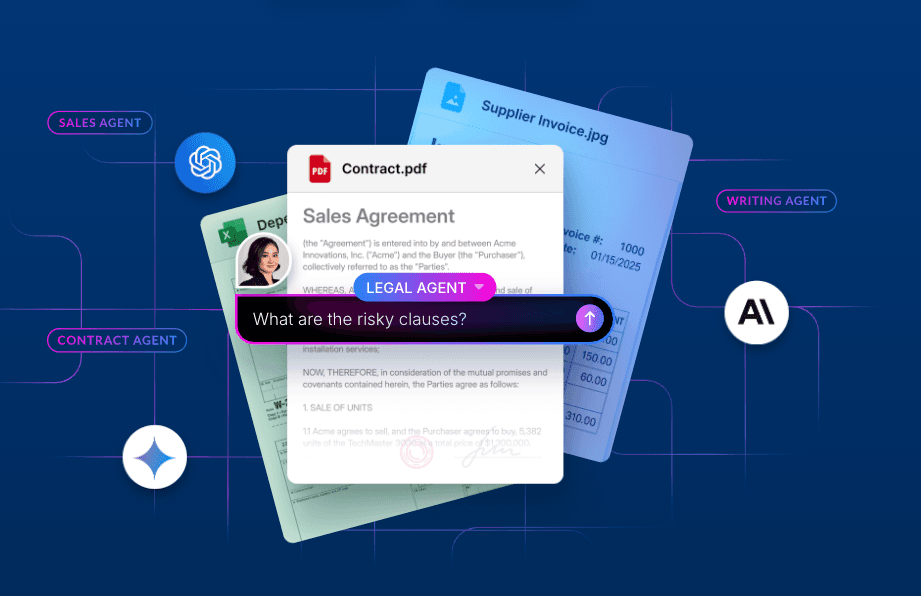
Documents rarely arrive as clean records. They arrive as PDFs, spreadsheets, reports, forms, and notes. The information inside them still needs to move work forward: route a claim, review a contract, prepare research, or update a shared knowledge base.
Box AI can help make that content usable in applications. But a useful workflow does more than just call one model. It needs a trigger, a way to find and interpret the right content, explicit application logic, and a place for people to review or use the result.
Across the examples in this post, a common pattern emerges: Box holds the source content and the resulting work, while APIs, SDKs, agents, AI frameworks, and application code coordinate what happens in between. The same foundation supports several kinds of workflows, from reacting to a new file to coordinating a multi-agent research process.
Let’s explore what’s possible. This article will help you pick the kind of workflow that’s right for your use case, outlines seven common patterns that you can choose from, and provides examples for each type of workflow.
Start with the workflow, not the model
When planning a workflow, start with the work that needs to happen and use the good old jobs-to-be-done framework.
Start off your workflow with statements like:
- "Help me [do action]..."
- "Help me avoid [unwanted outcome]..."
- "I need to [accomplish my goal] when [in this circumstance].
Dive deeper with these specific questions:
- What event or request starts it?
- Which documents provide the relevant context?
- What needs to be extracted, compared, or decided?
- Which steps should be deterministic, and which need AI interpretation?
- Where should the result go, and when should a person review it?
These questions help identify the workflow pattern that’s right for the problem you want to solve.
Seven helpful workflow patterns that Box AI can power include:
- Multi-agent workflows
- Mutli-step workflows
- Deep research workflows
- Event-driven workflows
- Scheduled agents
- Company brain: a knowledge repository
- Sandboxed filesystem workflows
Note: It’s important to know that these categories aren’t mutually exclusive. A single application might be event-driven, multi-step, and use several agents.
Multi-agent workflows: split a goal into specialist work
Use this pattern when: a task naturally decomposes into roles such as discovery, extraction, analysis, and artifact creation.
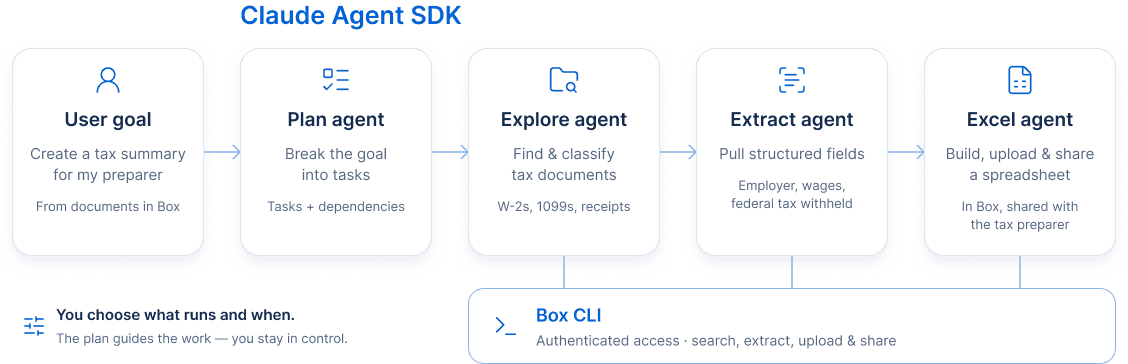
Some goals involve several distinct tasks. One agent can plan the work, another can find and classify source documents, another can extract fields, and another can produce a final artifact.
In this tax document preparation example powered by Claude Agent SDK and Box, a user asks for a working Excel sheet from a few tax documents. A planning agent breaks the goal into tasks. An exploration agent finds W-2s, 1099s, and receipts in Box. An extraction agent gathers fields such as employer, wages, and federal tax withheld. An Excel agent builds a summary spreadsheet and uploads it to Box to share with the preparer.
The agents use the Box CLI to search and work with files. Skills provide operating instructions for the Box commands and for each specialist role. The user sets the goal, while the agents divide the work and produce a reusable result.
This pattern is useful when the task benefits from clear specialist boundaries. Each agent can have a narrower purpose, a smaller set of tools, and an explicit output. That makes the workflow easier to inspect than a single opaque instruction asking one agent to do everything.
Explore the tax-with-box source code here.
Multi-step workflows: combine AI, code, and human review
Use this pattern when: a reliable result requires several stages, or when a human checkpoint belongs in the process.
Many workflows are sequences rather than single actions. They may use AI to interpret messy documents, ordinary code to apply rules, and a person to approve exceptions or consequential changes.
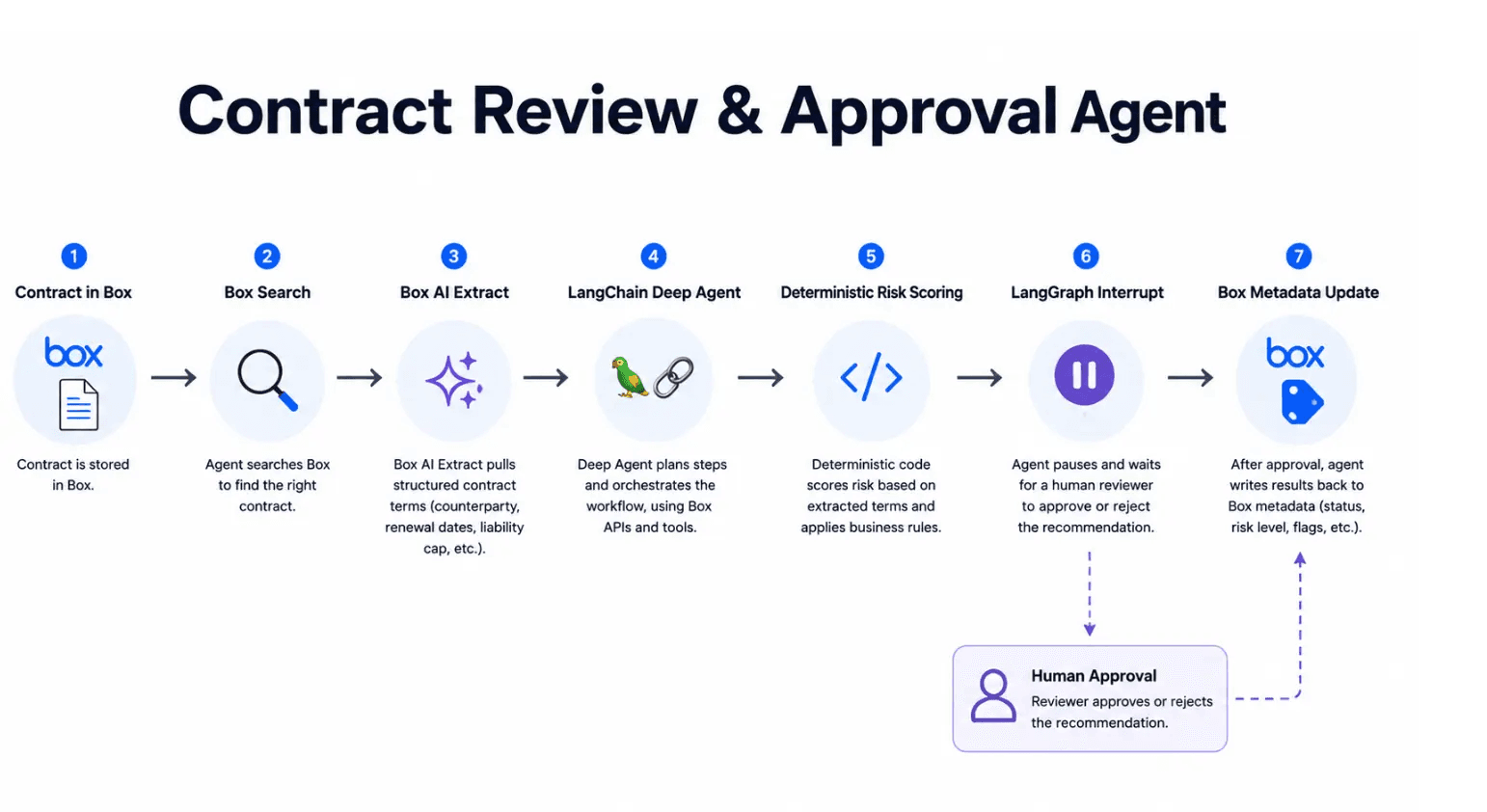
Consider this contract review workflow. An agent finds a contract in Box, extracts terms such as dates and obligations, and passes the structured values to deterministic code for risk scoring. The workflow can write the results as metadata and pause for human approval before committing a consequential action.
The open-source implementation is available to explore.
Onboarding verification follows a similar shape. In this example, the application extracts fields from an identity document, a utility bill, and a tax form. It compares values that should agree, generates a report, and sends discrepancies to a reviewer. The model handles varied document layouts; code compares the fields; a person handles exceptions. The sample app and fictional documents are on GitHub.
For a smaller-scale example, this invoice workflow classifies invoices, files them by expense category, and creates a report. Its source code is also available.
Keeping these responsibilities distinct is useful. AI can interpret unstructured content. Application code can enforce thresholds, permissions, and routing rules. A reviewer can resolve ambiguity or make the final decision.
Deep research workflows: connect external evidence to internal context
Use this pattern when: an answer depends on multiple sources, must be traceable, or needs to become a repeatable research artifact.
Research workflows must often combine sources that were not created for one another. External information may be spread across websites, languages, and formats, while the organization’s own context lives in selected files or a curated Box Hub.
One example, built with Temporal, OpenAI, and Box AI, starts with a business question about how audiences discover independent films in several markets around the world. The workflow plans market-specific searches, gathers external evidence, synthesizes and localizes the findings, and publishes a research pack to Box. Box AI then compares the external report with selected internal content and produces a cited decision brief.
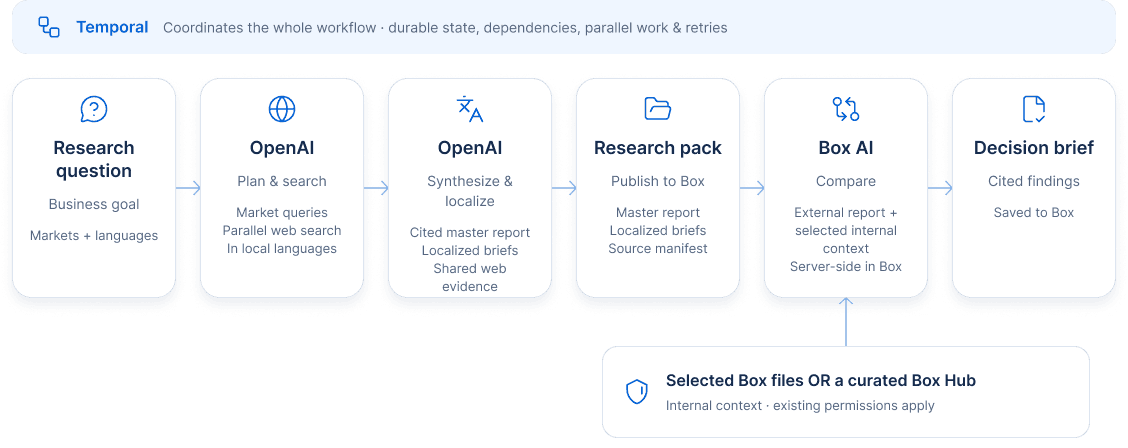
This example shows why research is more than summarization. The workflow needs to preserve sources, distinguish external findings from internal context, and produce deliverables that can be reviewed and reused.
Event-driven workflows: start when content changes
Use this pattern when: a content event is a reliable signal that work should begin, and the next action can be described as a defined process.
An event-driven workflow begins when something happens: a file is uploaded, a document is signed, or an incident is resolved. The application responds to that event and moves the content to its next step.
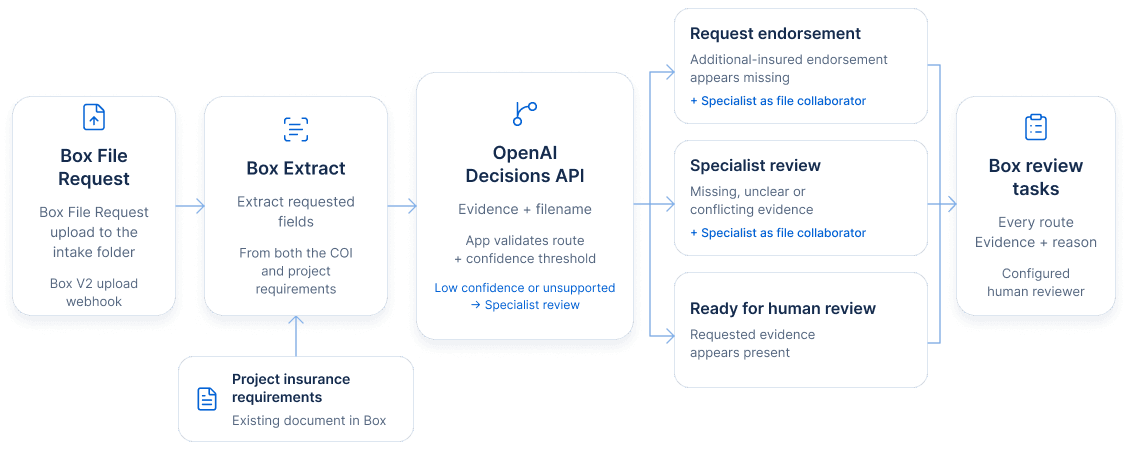
For example, a certificate of insurance can arrive in Box through a File Request. In this Box Extract and OpenAI Decisions API demonstration, an application extracts relevant fields from the certificate and project requirements, evaluates the evidence against a set of routing options, and creates a Box task for the right reviewer. Missing or unclear evidence can go to a specialist; an apparent missing endorsement can receive a more specific review task.
In this case, the important design choice is that AI helps interpret the documents, while application logic controls the available routes. The workflow can include the evidence and reason in the review task so that a person has context when they take over.
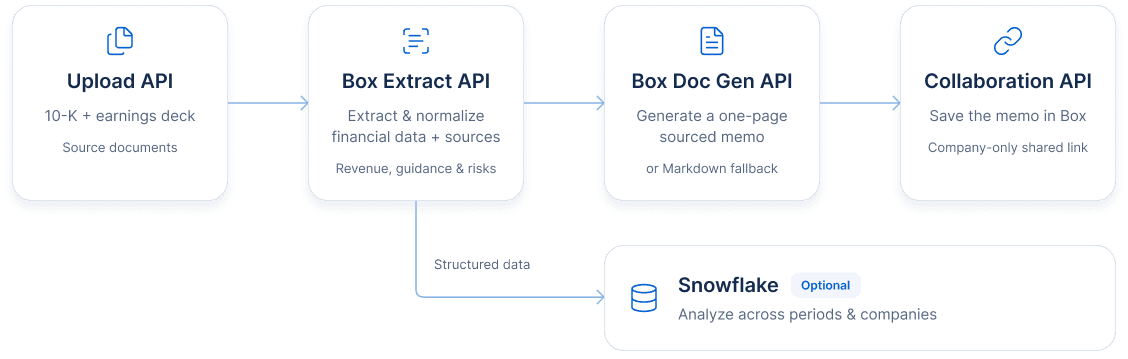
Another example is a sourced investment memo pipeline that uploads a company’s annual filing and earnings deck to Box, extracts revenue, guidance, and risk factors, and creates a sourced investment memo.
The structured data can also go to Snowflake, where analysts can compare results across companies and reporting periods while retaining references to the Box source files.
The Python demo includes the workflow code and sample materials.
Scheduled agents: revisit changing content over time
Use this pattern when: the content changes over time and someone would otherwise need to remember to revisit the analysis.
Not every workflow should run only once. A scheduled agent can periodically check for new or updated content, compare it with an existing analysis, and update a shared artifact only when something material changes.
In this deal-room example, an agent checks a Box folder for new or updated documents, compares them with a due-diligence memo, and updates a risk register as a new file version when the evidence changes. The team can see what changed, and the version history preserves the earlier assessment.
This is different from an event-driven workflow, which reacts to a specific event. A scheduled agent checks periodically and can consider several changes together before deciding whether to act. The right choice depends on whether the workflow needs immediate response or periodic review.
Company brain: make trusted knowledge usable and reusable
Use this pattern when: teams need answers grounded in approved content, or when operational work should contribute reusable knowledge back to a shared collection.
“Company brain” describes a governed body of organizational knowledge that people and agents can use. The content is not simply placed in a prompt. It remains organized in Box, where access and ownership already exist, and an application or agent uses it for a specific job.
A campus assistant, for example, can answer student questions using approved handbooks, calendars, service directories, and policies collected in a Box Hub. In this campus assistant example, the Hub creates a curated knowledge boundary, and an embedded chat interface makes the content available to students.
A renewal copilot can use a customer Hub containing agreements, support escalations, success plans, pricing guidance, and meeting notes. In this Box and Hermes Agent walkthrough, an agent prepares a cited briefing from those sources and saves the result as a Box Note for the account team.
The Box skill for Hermes provides the agent with instructions for working with Box. The source documents and generated brief remain part of the team’s content workspace.
A company brain can also improve over time, as shown in this incident knowledge workflow. When an incident is resolved, a workflow can extract lessons, compare them with existing guidance, and propose a knowledge update. A human reviews the proposal before it becomes part of the trusted collection.
This sample repository contains the implementation.
Sandboxed filesystem workflows: make Box part of the agent’s workspace
Use this pattern when: an agent runs in a sandbox and needs a file-based workspace that can read Box content and return its outputs to Box.
Some agents run in sandboxes and work with collections of files using command-line tools, libraries, and local code. In that setting, documents are more than context for a prompt: they’re part of the agent’s working environment. When this happens, you need to ensure that the content is available to the sandbox and that the agent’s work can be returned to Box.
Box Mount provides a POSIX-compatible workspace for this pattern. An application provisions the sandbox and runs the agent; Box Mount connects a Box folder to a directory inside that environment. The agent can read and write files through familiar filesystem paths, while Box Mount synchronizes changes between the sandbox and Box. People can review the results in Box, and updates made there can flow back into the mounted workspace.
For example, an agent can read an incoming contract and an approved playbook from the mounted folder, generate a review memo, and write that memo to a review folder. An attorney can then edit or review the result in Box. The workflow can use different models, agent frameworks, or command-line tools, as long as they work with files.
This pattern is useful when agents need to work with multiple files or existing file-based tools, or when people and agents need to share a working collection over the course of a task. If an agent only needs to retrieve a document once and include it in a prompt, a direct API or MCP call may be enough.
This Box Mount walkthrough demonstrates a contract-review workflow with an E2B sandbox. Its linked example repository is private and available to preview participants; there is no public repository to link.
How these patterns can work together
These categories describe different parts of a workflow, so they often combine. A scheduled agent can use multiple specialist agents. A deep research workflow can be multi-step. An event-driven workflow can pause for human review. A company brain can be the source for any of them, and Box can hold the resulting reports, metadata, or decisions.
However, the common architecture is straightforward. Box is the content layer and interface for both agents and humans, you add custom AI and application logic, and the end result is stored and versioned securely back in Box.
You don’t need to build a company-wide agent platform to get started. Choose one recurring task with clear inputs and a useful output. Identify the Box content involved, define what the workflow should extract or decide, and make the result easy to review.
Then, test out the workflow. Evaluate it on representative documents. Check whether it finds the right content, preserves source references, handles missing or conflicting evidence, and routes uncertain cases appropriately. Once you’re confident that it works, you can add triggers, specialist agents, additional data sources, or recurring checks.
This is how unstructured content becomes part of software’s control flow – by building workflows that can interpret content, make explicit decisions, and return useful work to the people who need it.