This article was originally published on July 31, 2026. See it on X.
Most incident reports contain at least one thing that would help the next engineer who runs into the same problem.
Maybe it’s the symptom that sent everyone in the wrong direction. Maybe it’s the diagnostic step that finally narrowed things down, or the undocumented dependency that turned out to be the real culprit.
The problem is that those details tend to stay in the incident report. The team restores service, closes the incident, and moves on. A few months later, someone hits the same issue and has to reconstruct the solution from old reports, Slack threads, and whoever happens to remember what happened.
I wanted to see if I could make that handoff a little more automatic.
So I built a small Node.js app that watches for resolved incidents in Box. It pulls out the useful operational details, compares them with an existing knowledge Hub, and drafts a proposed documentation update. A human reviews the proposal in Box before anything gets published.
Box brings together the content, AI, tasks, metadata, and webhook capabilities needed for this implementation. The broader pattern is also what makes the workflow interesting: knowledge systems should help teams improve what they know, not only retrieve it.
Work produces new information

↓

Pull out the reusable parts

↓

Compare them with trusted knowledge

↓

Suggest a specific change

↓

Have someone review it

↓

Publish it back into the trusted collection
That feedback loop is a big part of what makes a “company brain” useful. It shouldn’t only answer questions using the knowledge you already have. It should also help you keep that knowledge up to date.
The full sample is available on GitHub: box-community/incident-to-knowledge-webhook
The basic idea
The demo uses a simple folder structure in Box:
Incident Knowledge/
├── Resolved Incidents/
├── Knowledge Drafts/
└── Approved IT Knowledge/
The approved articles are connected to a Box Hub, which acts as the trusted knowledge collection.
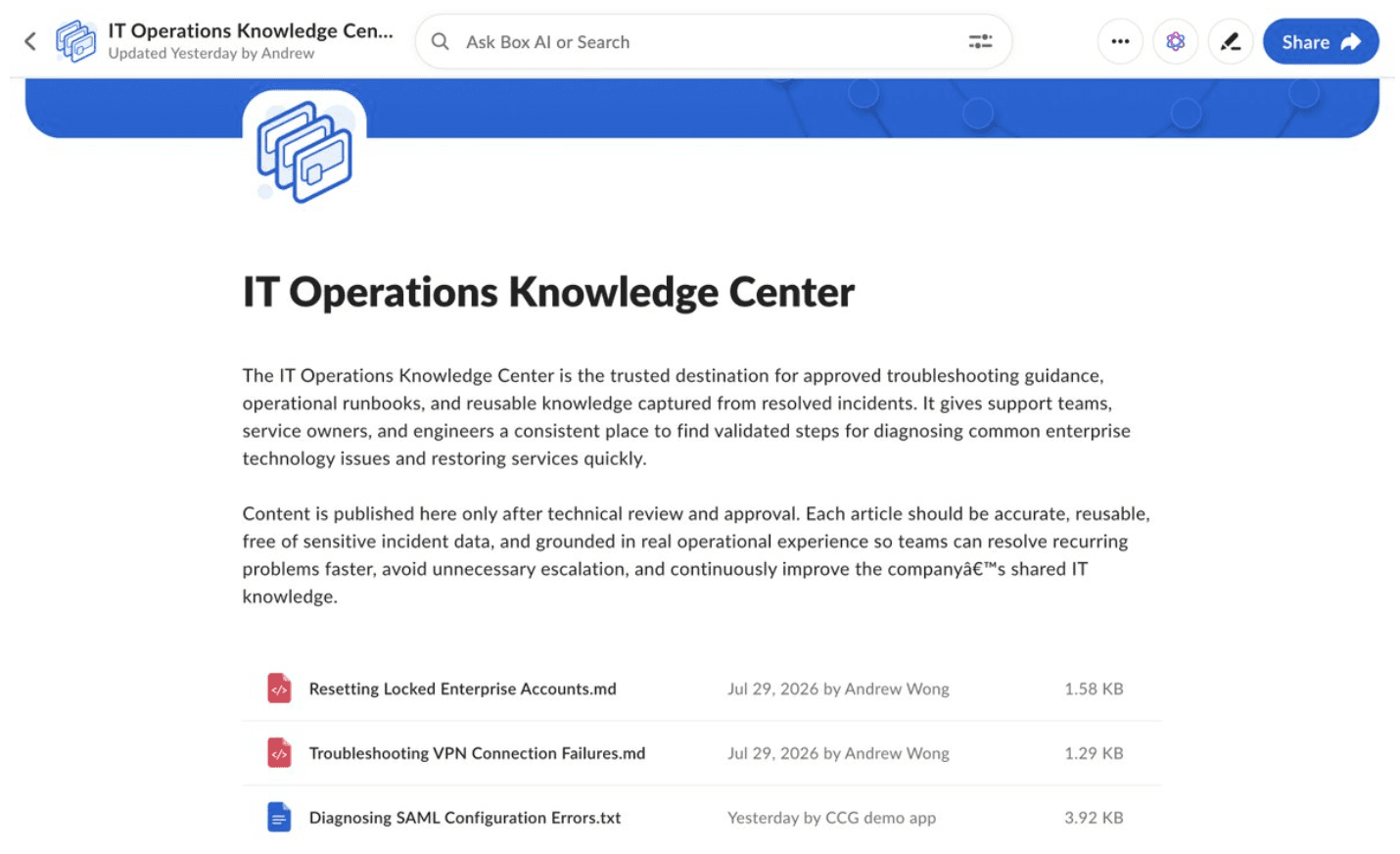
The IT Operations Knowledge Center Hub, containing the approved articles used by the workflow.
When someone changes an incident’s metadata status to Resolved, Box sends the app a webhook. The app then:
- Extracts structured facts from the incident report.
- Compares those facts with the current Hub.
- Recommends updating an article, creating one, or making no change.
- Generates a review document.
- Assigns a Box review task.
- Publishes only after approval.
Slack can send the reviewer a link, but it’s optional. If Slack isn’t configured, the app logs the same notification and Box review URL to the console.
Approval always happens in Box. Slack is just there to get someone’s attention.
Why I started with incidents
Incident reports are packed with potentially reusable information:
- What users actually experienced
- Which signals were misleading
- What the team checked first
- What the root cause turned out to be
- Which workaround helped
- How the problem was fixed
- What might prevent it next time
- When another team should get involved
At the same time, an incident report usually contains plenty of material that should not become permanent documentation. Names, internal IDs, timestamps, noisy investigation notes, and one-off environmental details may all be important during the incident without being useful later.
The goal isn’t to publish the report in a nicer format. It’s to pull out the parts that could genuinely help someone solve the next occurrence faster.
Keeping the webhook handler boring
The workflow starts with a Box V2 webhook:
METADATA_INSTANCE.UPDATEDI kept the webhook endpoint intentionally small. It verifies the Box signature, stores the event, creates a job, and returns 202 Accepted.
Here’s a simplified version:
async function handleWebhook(req, res) {
    const valid = await box.verifyWebhook(
        req.rawBody,
        req.headers
    );
    if (!valid) {
        return res.status(401).json({
            error: "Invalid Box signature",
        });
    }
    const accepted = database.enqueueEvent({
        eventId: req.body.id,
        trigger: req.body.trigger,
        payload: req.body,
    });
    return res.status(202).json({
        accepted,
        duplicate: !accepted,
    });
}
The handler doesn’t call Box AI, upload files, or wait for Slack. Those operations can take a while, and webhook deliveries may be retried if the request is interrupted.
A small worker pulls jobs from SQLite and handles the longer-running workflow. Each webhook event is deduplicated by event ID, and each completed workflow step is saved.
That means a restart doesn’t automatically send the app back to the beginning. If extraction finished but the Hub comparison didn’t, the workflow can continue from the saved extraction.
SQLite and an in-process worker are fine for a local sample. I’d swap them for managed infrastructure in production, but they keep the project easy to clone and understand.
First, turn the incident into structured facts
The first AI request doesn’t ask for an article. It asks Box AI to extract a defined set of fields from the incident:
const incidentFields = [
    "issueTitle",
    "affectedSystem",
    "symptoms",
    "rootCause",
    "resolutionSteps",
    "temporaryWorkaround",
    "preventionSteps",
    "escalationGuidance",
    "safeForInternalReuse",
];
I found it much easier to work with a structured incident summary than to send the entire report directly into an article-generation prompt.
The workflow is really trying to answer a few separate questions:
- What happened?
- Is any of it new?
- Where does that knowledge belong?
- What should the proposed documentation look like?
Structured extraction handles the first question and gives the later steps cleaner input. It also creates a useful place to add validation or redaction rules in the future.
Compare before creating more content
After extraction, the app asks Box AI to compare the incident facts with the approved content in the Hub.
The response has to choose one of three outcomes:
- UPDATE_EXISTING
- CREATE_NEW
- NO_CHANGE
UPDATE_EXISTING means the new guidance belongs in an article that already exists.
CREATE_NEW means the incident taught us something reusable, but none of the current articles is the right place for it.
NO_CHANGE means the Hub already covers the issue, or the incident didn’t add anything worth publishing.
I’m glad I added that last option. If every incident automatically creates content, the knowledge base will eventually fill up with overlapping articles that say almost the same thing. Sometimes the right answer is simply that the current documentation is fine.
When the AI recommends an update, it also has to cite the target article from the Hub. The app won’t accept a filename that only appears in the model’s answer.
A simplified version of that check looks like this:
function selectUpdateTarget(answer, citations) {
    if (answer.decision !== "UPDATE_EXISTING") {
        return undefined;
    }
    const matches = citations.filter(
        citation =>
        citation.name === answer.targetFileName
    );
    if (matches.length !== 1) {
        throw new Error(
            "Expected one cited article to update"
        );
    }
    return matches[0];
}
The AI still gets to do the fuzzy work of deciding where the knowledge belongs, but the application verifies that the selected file came from the trusted Hub results.
I like this balance. Let the model reason, then use normal application logic to check the parts that matter before taking action.
Give the reviewer something useful to review
Once the app has a recommendation, Box AI drafts the proposed content.
For an update, it generates a complete revised version of the existing article. For a new article, it creates a fresh troubleshooting guide. A NO_CHANGE decision skips the article generation but still gets an explanation.
The app then creates a review document containing:
- The source incident
- The recommendation
- The selected target article
- The reasoning
- The knowledge gaps it found
- The Hub sources it considered
- The proposed article content
That file goes into the Knowledge Drafts folder, and the app creates a Box review task for the configured reviewer.
const task = await box.createReviewTask({
    fileId: draftFileId,
    message: `Review the recommendation from ${incidentId} ` +
        `(run ${runId}).`,
    completionRule: "all_assignees",
});
await box.assignTask({
    taskId: task.id,
    reviewerUserId,
});
This is where I wanted the AI portion of the workflow to stop.
The AI can extract information, compare it with existing content, and prepare a strong first draft. In this workflow, it deliberately does not publish shared operational guidance on its own.
That feels like the right tradeoff for this use case. Reviewing a focused proposal with citations is much easier than rereading the full incident report, but a person still decides whether the recommendation is correct and safe to reuse.
Approval comes back through another webhook
The app doesn’t keep a process waiting while someone reviews the document.
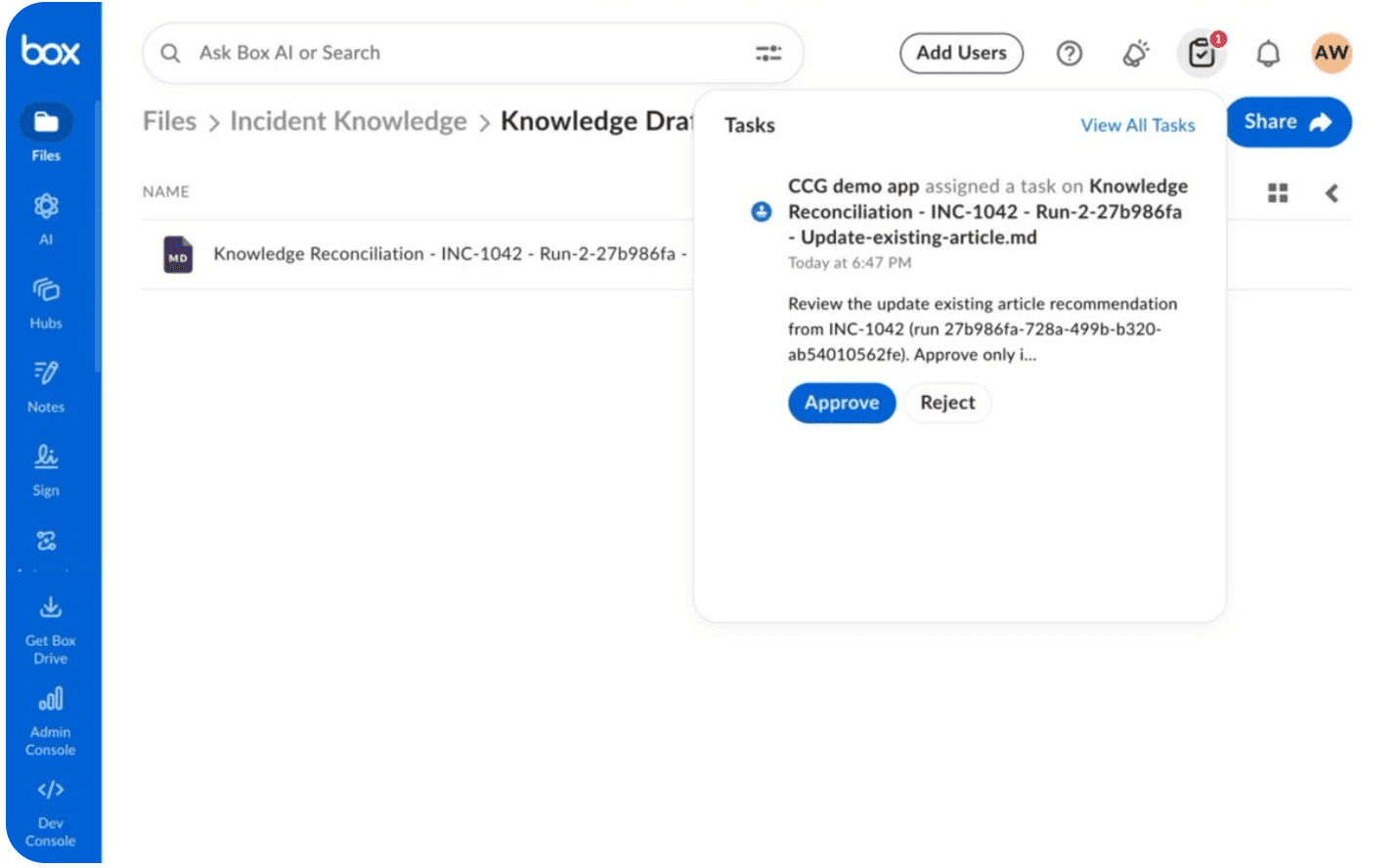
When the reviewer approves or rejects the task, Box sends another webhook:
The assignment ID tells the app which workflow run to resume. It also checks that the assignment belongs to the expected reviewer.
TASK_ASSIGNMENT.UPDATEDA rejection closes the run without touching the approved knowledge.
An approval applies the recommendation:
- Upload a new version of an existing article
- Create a new article and add it to the Hub
- Record that no change was needed
The incident’s knowledge status is updated afterward, and the app posts the final result to the Slack thread or console.
Making sure we don’t overwrite someone else’s work
There can be a long gap between creating a proposal and receiving approval. Someone else might edit the target article during that time.
If the app simply uploaded its approved draft, it could overwrite that newer work.
To avoid that, the workflow saves the target article’s version ID when it prepares the review. Right before publishing, it fetches the article again:
const current =
    await box.getFileSnapshot(targetFileId);
if (current.versionId !== run.reviewedVersionId) {
    const alreadyApplied =
        current.sha1 === sha1(run.proposalContent);
    if (!alreadyApplied) {
        throw new Error(
            "Target changed after review was prepared"
        );
    }
}
If the version changed, publication stops unless the current file already matches the approved proposal.
That second check handles a specific failure case: the app may have uploaded the new version successfully and then stopped before saving that fact locally. When the job runs again, it can recognize that the approved content is already there instead of uploading it twice.
The reviewer approved a proposal based on a particular version of the article. If the article changes underneath that proposal, asking for another look is safer than overwriting it.
Rerunning the same incident uncovered a bug
The first version of the app treated an incident file and its workflow run as the same database record.
It worked until I tried running the demo again.
The app reused the previous draft, found the old task attached to it, and then reused the old reviewer assignment. When it tried to attach that assignment to the new run, SQLite rejected it:
The fix was to model each workflow execution separately.
UNIQUE constraint failed:
knowledge_runs.assignment_id
Every run now gets its own:
- Run ID and run number
- Draft
- Task and assignment
- Notification thread
- Saved workflow state
The incident file can stay the same. Previous drafts and database history can also stay in place.
To rerun the demo, I reset the incident metadata and mark it resolved again. The app creates a new execution rather than trying to repurpose the previous one.
This is useful beyond the demo. If something can be retried or processed more than once, the source item and the individual processing attempt usually need separate identities.
Slack is optional
Slack is useful for sending a reviewer a link, but I didn’t want it to be required just to run the demo.
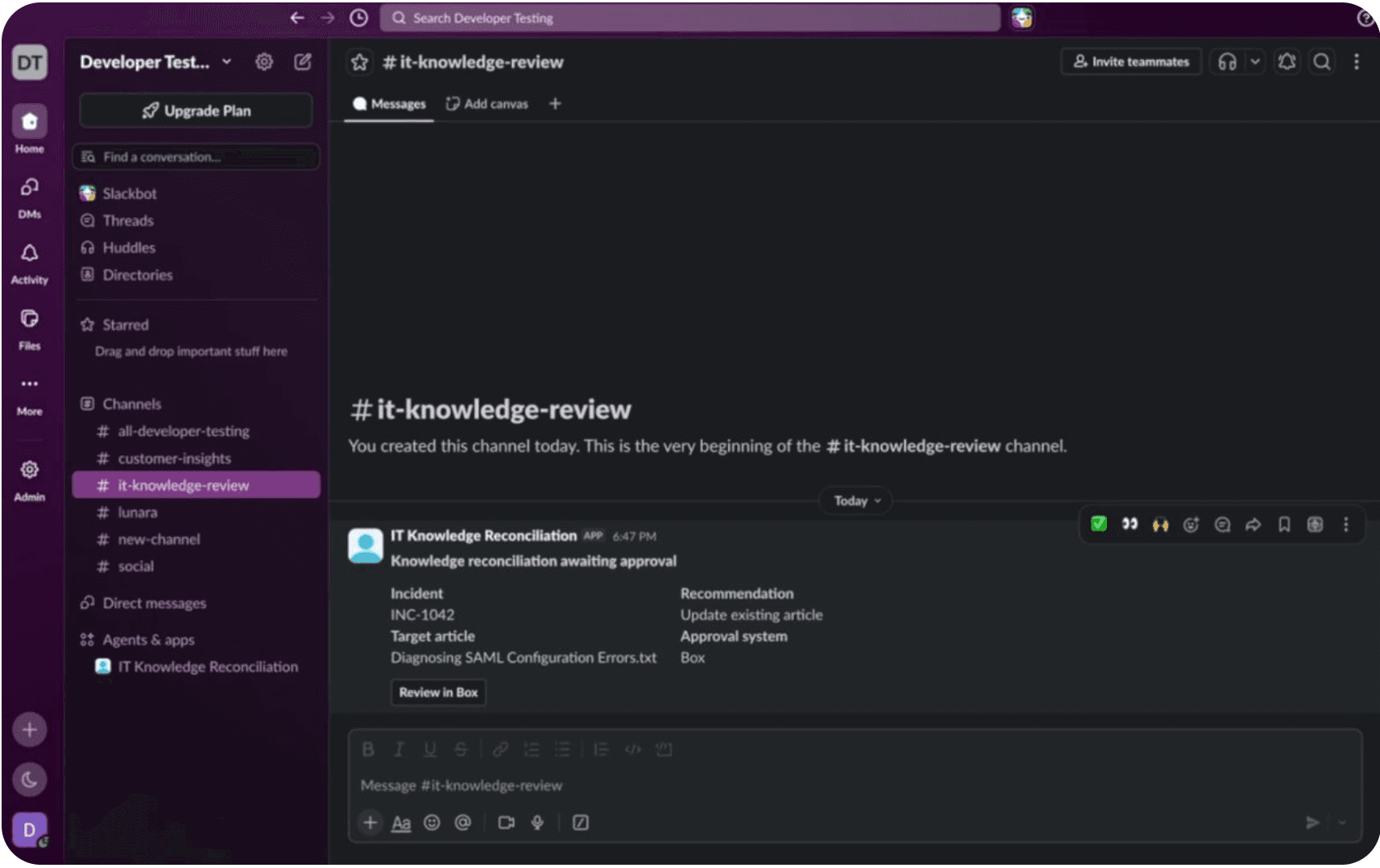
At startup, the app chooses between two notifier implementations:
const notifier =
    token && channelId ?
    new SlackNotifier({
        token,
        channelId
    }) :
    new ConsoleSlackNotifier({
        logger
    });
The workflow calls the same methods either way:
await notifier.postProposal(...);
await notifier.postResult(...);
Without Slack credentials, the console implementation prints a clearly labeled mock notification containing the Box review URL.
This keeps Slack-specific checks out of the main workflow. The app always has a notifier; configuration determines whether that notifier talks to Slack or the terminal.
Why Box was a natural fit for this workflow
I wasn’t trying to build a general-purpose AI system. I wanted one complete loop that could notice new knowledge, compare it with trusted content, route a proposal for review, and publish the approved result.
Box brought the pieces of the workflow together in one governed content platform:
- Files and folders for incidents, drafts, and approved content
- Metadata for triggering and tracking the workflow
- Hubs for the trusted knowledge collection
- Box AI for extraction, comparison, and drafting
- Tasks for human review
- Webhooks for events
- File versions for safe updates
- Permissions for separating the content owner from the runtime service account
The useful part is that these pieces share the same content model. A Hub citation points to the same file that can receive a task, keep a version history, and later receive an approved update.
There’s less glue code because the workflow isn’t constantly translating between unrelated document, task, identity, and permission systems.
This pattern works for more than incidents
Once I started thinking of the company brain as a feedback loop, a bunch of other use cases looked similar.
- A resolved customer escalation could suggest an update to the help center.
- A security investigation could produce reviewed response guidance.
- A completed RFP could contribute to an approved answer library.
- A field-service report could suggest a missing maintenance procedure.
- A repeated HR question could point out a policy that needs clarification.
The content changes, but the flow stays familiar:
New evidence

↓

Extract what matters

↓

Compare it with trusted knowledge

↓

Prepare a specific proposal

↓

Review it

↓

Publish it
The AI model is only one part of that system. The surrounding workflow decides whether the output is grounded, reviewable, safe to apply, and recoverable when something goes wrong.
What I’d change before calling this production-ready
This is still a developer sample. SQLite and an in-process worker keep it easy to run locally, but a production version would need more infrastructure around it.
I’d likely add:
- A managed database and queue
- Metrics and alerts
- Event catch-up after downtime
- A small operator view for failed runs
- More detailed failure states
- Stronger validation of structured AI output
- Retention and lifecycle policies
- Integration tests against an isolated Box environment
I’d keep the main workflow shape, though. It’s simple enough to follow while still dealing with the less glamorous parts of real automation: duplicate events, delayed approval, concurrent edits, partial failures, permissions, reruns, and setup.
The individual model calls were relatively concise. Most of the engineering work (and much of the value) came from connecting them to grounded content, review, permissions, version safety, and recoverable workflow state.
Closing thought
When people talk about building a company brain, the conversation usually focuses on how employees will search or ask questions.
I’m just as interested in how new knowledge gets into that system.
Teams already produce the raw material every day through incidents, support cases, investigations, customer conversations, and project work. The difficult part is moving from “someone learned this” to “the next person can find it, understand it, and trust it.”
This workflow is one attempt at making that path shorter.
AI helps with the tedious parts: reading the source, organizing the facts, comparing them with existing material, and preparing a draft. The application adds the evidence checks, version safety, state management, and retries. A human makes the final call.
That combination goes beyond simply answering questions over documents: it helps ensure the underlying knowledge is continuously reviewed, improved, and kept trustworthy.
Want to try it yourself? Check out the sample on GitHub