Building technical solutions is becoming increasingly democratized. Interfaces that once required a dedicated development team, a custom retrieval pipeline, and weeks of integration work can now be assembled in hours with AI-assisted development and composable platform capabilities.
Higher education is a natural fit for this shift. Every year, millions of students begin new academic journeys and arrive with hundreds of practical questions:
- When does registration close?
- Where can I find counseling services?
- How do I request an accommodation?
- Who should I contact during a campus emergency?
The answers usually already exist, but they are distributed across handbooks, academic calendars, policy documents, service directories, and departmental guides. The challenge is not producing more content. It is making trusted content accessible through an interface students will actually use.
And the solution is just one link away, with Box Hubs, Box AI, and Box AI Chat embedding.
A deliberately simple solution
This project is intentionally simple, but still powerful. The architecture has only three essential layers: Campus documents organized in a Box Hub and an iframe element generated in Box web app.
First, create a free developer account to prototype this solution. Next, collect the approved source documents in Box. These could include an academic calendar, student handbook, campus safety procedures, financial-aid guidance, housing policies, or frequently asked questions.
Next, organize those files in a Box Hub. The Hub becomes the curated knowledge boundary for the assistant. Content owners can continue managing documents through familiar Box workflows while Box AI uses the Hub’s contents to answer questions.
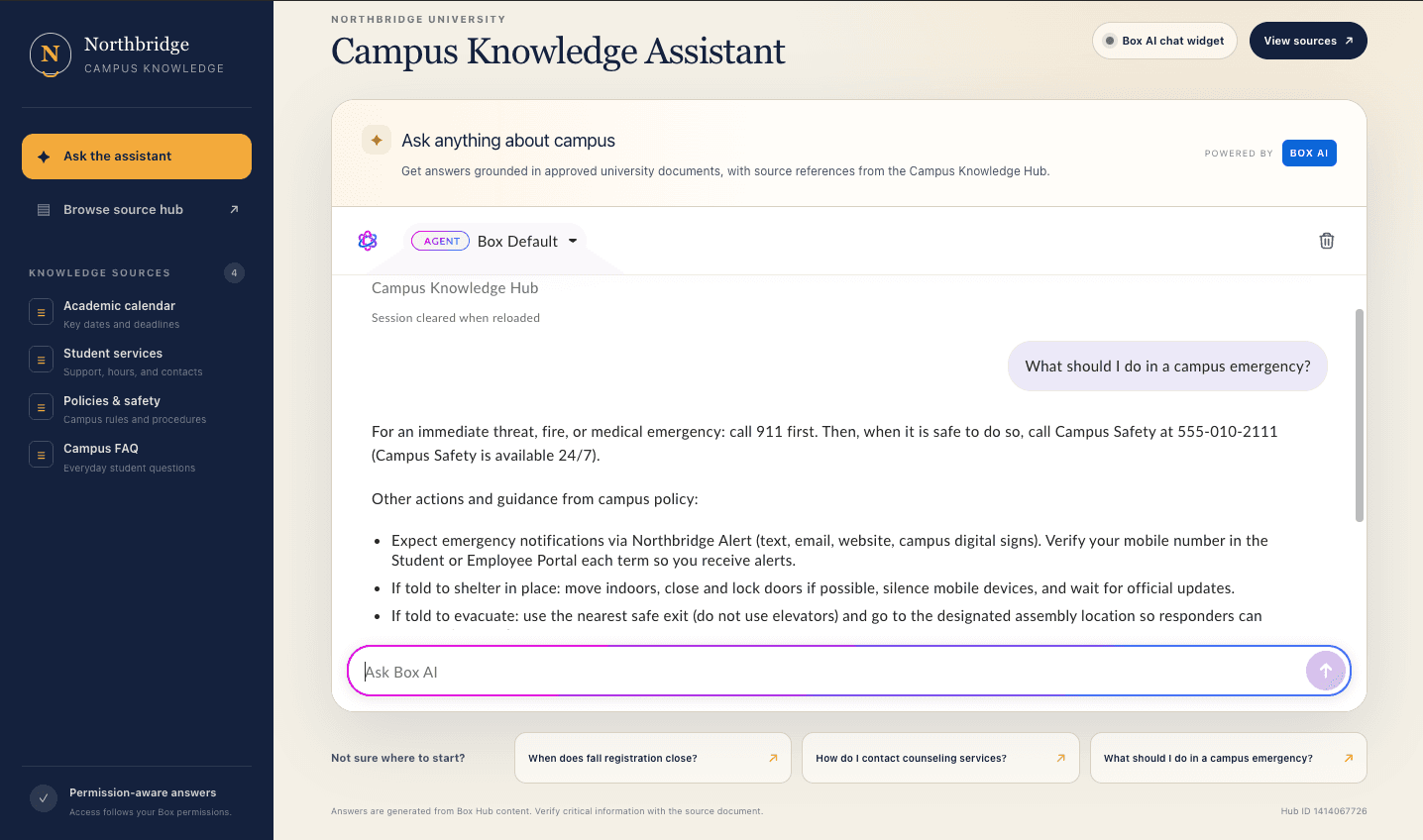
Finally, embed the Box AI Chat widget in the student-facing interface. There is no need to build a separate chat engine or move institutional content into another system. The user interacts with Box AI, while the university continues managing the underlying knowledge in Box.
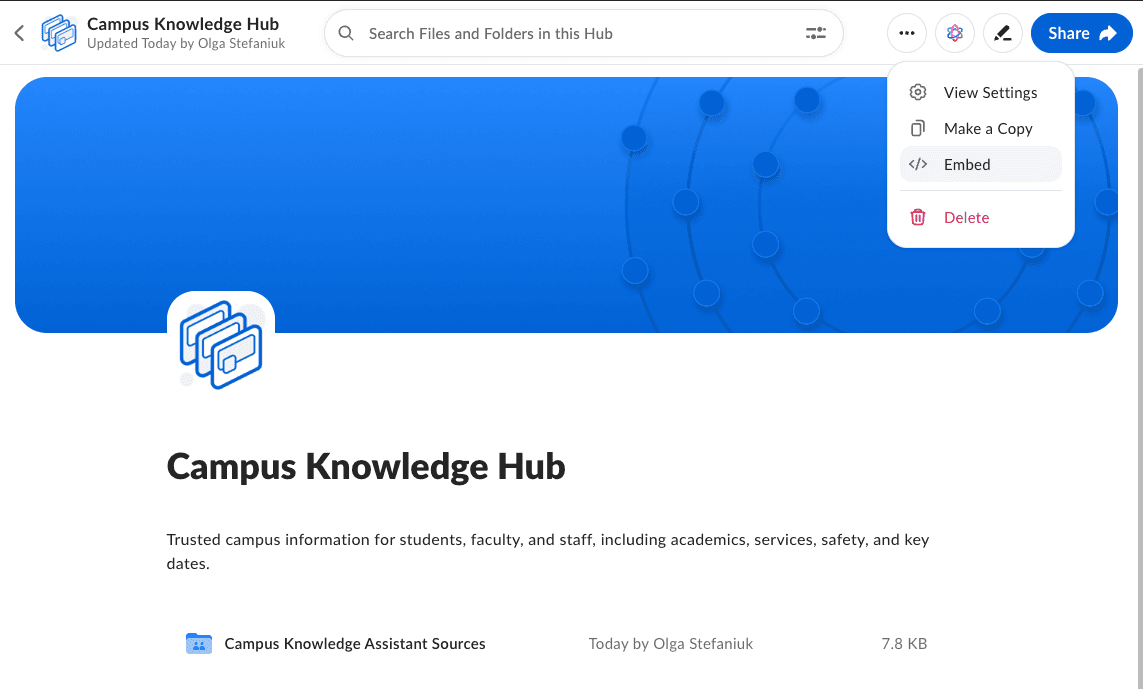
Here’s how: go to Box Hub, expand the menu and select Embed.
Choose the Hub AI Chat and Choose the chat widget. It comes in two different flavours, either as a chat window or an expandable chat modal. You can select Preview to see how the element presents itself.
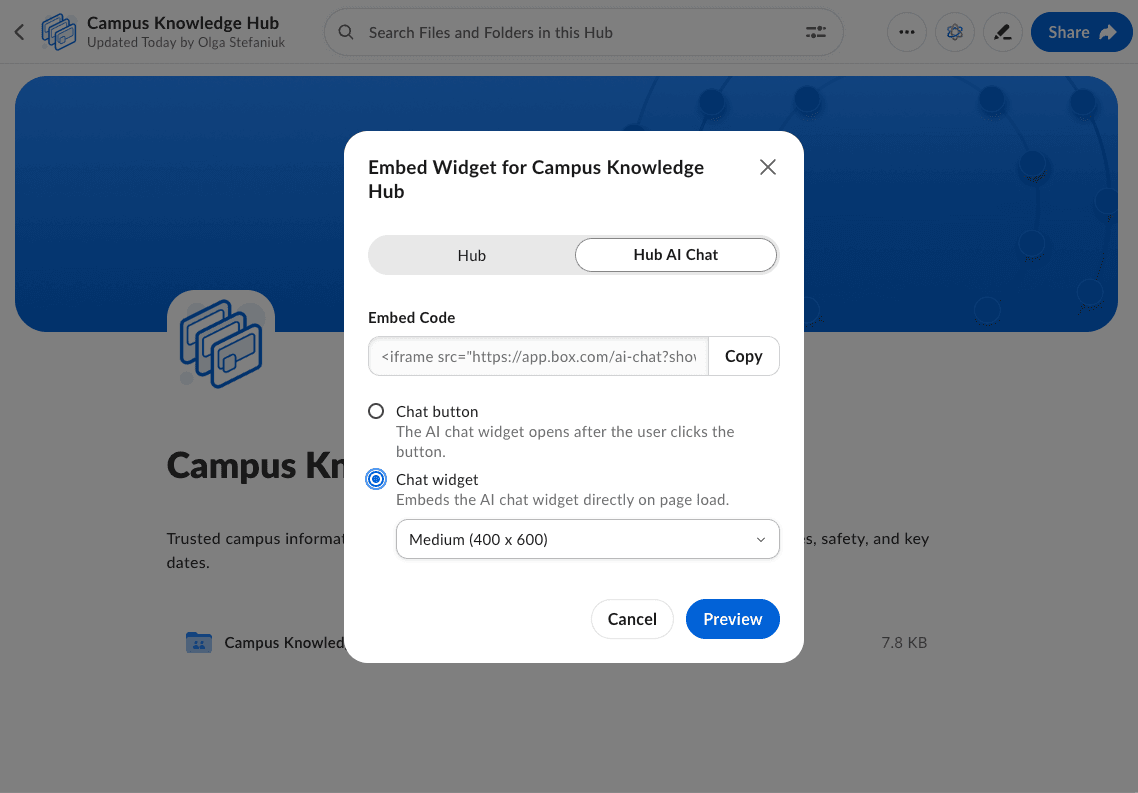
Copy the Embed Code and embed it on your student’s portal. In Chat widget mode, the full AI conversation interface loads immediately inside the page with simply this short code snippet:
<iframe src="https://app.box.com/ai-chat?showCloseButton=false&hubId=YOUR_HUB_ID&sharedLink=SHARED_LINK_VALUE" width="400" height="600" frameborder="0" allowfullscreen webkitallowfullscreen msallowfullscreen allow="clipboard-read *; clipboard-write *"></iframe>
The important parameter is hubId, which identifies the Box Hub that will ground the conversation and the sharedLink value. The complete parameter reference is available in the Box Hubs AI Chat embedding documentation.
Access remains identity-aware, so students need to be collaborated to the knowledge hub. In case of using the enterprise account must have Box AI for Hubs enabled, the user must authenticate with Box, and the user needs at least Viewer permission on the Hub. This makes the widget more than a generic public chatbot: the experience follows the content and access model already established in Box.
From one iframe to a complete campus portal
An iframe may be all that is required. It can be placed inside an existing student portal, learning platform, intranet, or support page with very little application code. But it can also become the foundation of a broader experience.
Using an AI coding agent with a Box Skill, you can prototype a complete campus knowledge portal around the same widget. A Box Skill gives the coding agent platform-specific workflows, guardrails, and verification steps instead of relying only on general model knowledge. Box recently demonstrated this approach in Building a Box Skill for OpenAI Codex.
The result can still be technically straightforward: a branded navigation layer, a list of knowledge areas, links back to the source Hub, and the real Box AI Chat widget as the primary interaction surface.
Content quality still matters
The quality of the assistant depends on the quality of the Hub. A useful production workflow should therefore include: selecting institution-approved documents, removing outdated or conflicting versions, verifying important answers against their source documents or testing representative questions against the Hub.
This is where Box Hubs provide an important operational advantage. The knowledge base remains a managed collection rather than becoming a one-time export copied into an external AI pipeline. When source content is maintained in Box, the same Hub can continue powering the embedded experience.
A small project with a large surface area
A campus knowledge assistant does not need to begin as a large digital-transformation initiative. Start with one audience, one Box Hub, and a focused set of trusted documents. Embed the AI Chat widget in an existing interface and test the questions students ask most often. If the concept proves valuable, expand the Hub, automate its management with the Box Hubs API, build a richer portal using Box Skills and AI-assisted development, or follow a company brain pattern to make consistent updates to the knowledge base.
The first version may genuinely be only one iframe away. The value comes from what sits behind it: curated institutional knowledge, Box AI, and an interface that gives students a faster path to answers