Cloud migration is the process of transferring an organization’s digital assets — such as servers, storage, applications, and data — from legacy, on-prem systems to a cloud-based environment. Whether you’re running a large enterprise or a small business, you’ll need this transition to support growing workloads and advance your digital transformation initiatives.
Migrating to the cloud is more complex than shifting a document from one folder to another. It involves reconfiguring your assets and adjusting systems and workflows to make sure your content stays available when you need it.
Let’s review what goes into moving to the cloud and how to secure a smooth transition.
Key highlights:
- Cloud migration is the process by which your organization’s digital assets, including servers, applications, and data, move from on-prem systems to a cloud infrastructure
- There are many benefits of cloud migration, such as scalability, cost-efficiency, data interoperability, stronger security, and more
- On-premise to cloud migration works best when you plan your data transfer carefully and pick the right tools to make the transition smooth and easy
- Box Shuttle provides a seamless platform for migrating legacy systems to the cloud, with customizable settings, secure integrations, and on-prem and cloud tools
What you need to know about cloud-based migration
Traditionally, businesses stored their data in many physical and digital spaces, including network file shares, enterprise file synchronization and sharing (EFSS) tools, and legacy enterprise content management (ECM) systems.
This fragmentation made it difficult for organizations to access their information and keep it secure. Managing your content lifecycle in the cloud helps keep your contracts, agreements, and other files accessible anytime from any location through an internet connection.

If you’re new to this process, here are a few basics on cloud migration you should know:
- Cloud-based migration enables new opportunities for collaboration with internal and external stakeholders, which means getting work done faster and in a more efficient way
- Content migration, which means moving all fragmented files to one location, can be time consuming, depending on the cloud migration service you use and the amount of data involved
- Migration to the cloud optimizes your work by removing duplicate files or reworking your IT processes, and it will have a big impact on how well you’ll realize the benefits
Why migrate to the cloud
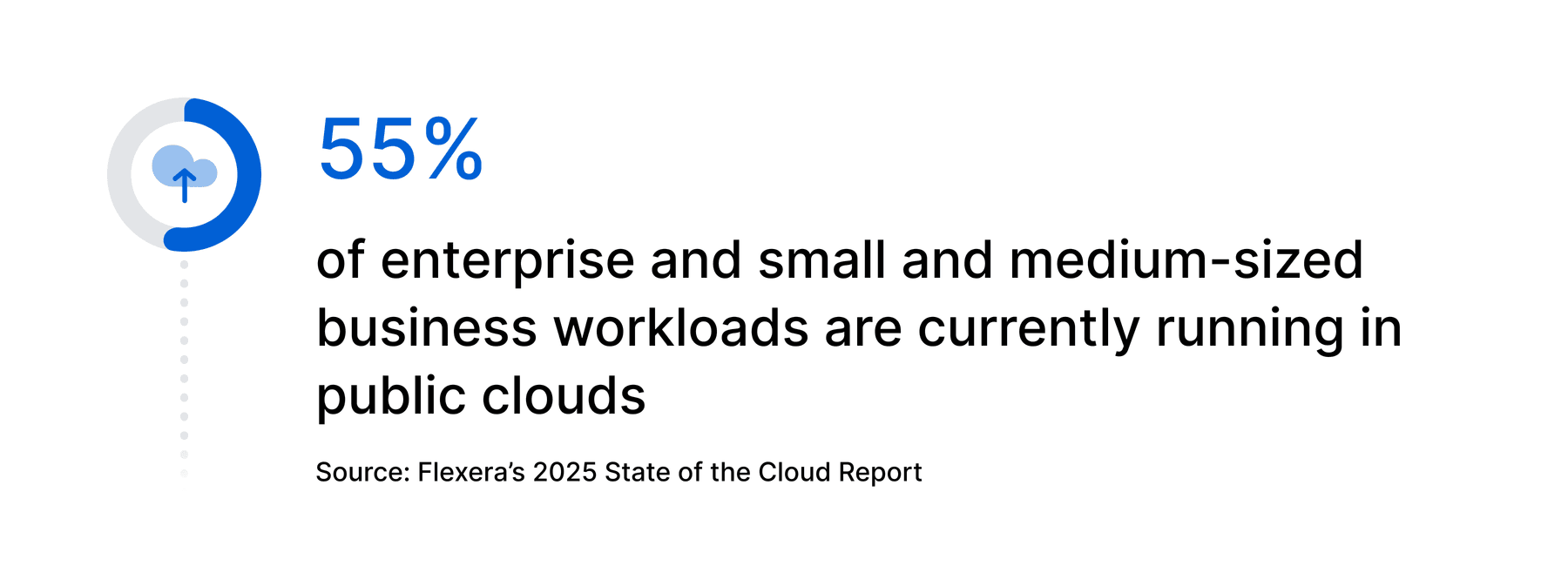
The migration to cloud services is a widespread business strategy. According to Flexera’s 2025 State of the Cloud Report, 55% of enterprise and small and medium-sized business workloads are currently running in public infrastructures.
The role of the cloud in digital transformation is one of the reasons why businesses abandon legacy systems. With a cloud-based platform, you scale up or down based on demand, paying only for what you use instead of maintaining expensive on-prem infrastructure. This flexibility gives you a competitive advantage, allowing you to respond quickly to market changes.
But there’s another factor speeding up business cloud migration: enterprise AI adoption.
While legacy systems fail to integrate with AI-powered workflows, cloud solutions provide real-time insights and automation, simplifying processes and helping you realize more value from your unstructured data, including documents, media files, and other information that doesn’t have a structured format.
Learn the key steps to build a successful enterprise AI strategy.
Benefits of cloud migration
Cloud migrations can add a lot of value to many different organizations, especially small and mid-sized companies. Discover the advantages for your business operations.

1. Scalability
One of the reasons why cloud migration for small businesses is attractive is that it supports growth, offering scalable cloud data storage and eliminating the need for costly new on-site servers.
Flexible cloud storage capacity also supports rising demands, such as a spike in traffic during an online sale or the setup of new business locations, which is much easier with the cloud.
2. Cost efficiency
A Box-sponsored Forrester study revealed that companies that moved to the cloud saw productivity gains that led to $14.5M in savings. Cloud-based systems also simplify IT infrastructure, reducing the time your team spends maintaining complex tools.
Another benefit of cloud migration is converting your data lifecycle management costs from a capital expense to an operating expense, a model that’s often more manageable for growing businesses.
3. Data interoperability
Cloud migration services also enable data interoperability, which means your information can move across tools or departments without requiring manual intervention or extensive reformatting.
When your data is in the cloud, employees can quickly start working from home or on their phones, thanks to the built-in security. They can access their content even from outside the corporate network.
Read our guide on best practices for remote work enablement.
4. Enhanced security
When it comes to cloud security, your service provider will keep up with the most recent threats and technology trends, issuing updates and fixes automatically and without the need for implementation from your IT team.
Another advantage of a convenient, fast cloud program is eliminating shadow IT, which reduces the risk of security gaps caused by unapproved tools.
5. Improved infrastructure performance
IT experts optimize cloud servers for effective data management. That means using cutting-edge technologies like retrieval-augmented generation (RAG) to provide a better experience for users. You can significantly boost your performance automatically without the need for additional maintenance.
6. Faster access to innovation
Are you building an AI-first business? Start with a cloud migration strategy. Businesses often migrate to the cloud to speed up AI adoption. With AI-powered solutions — such as Intelligent Content Management — teams can speed up workflows while securing valuable data. A study by MIT Tech Review Insights in partnership with Infosys Cobalt indicates that 71% of business executives expect spending on cloud infrastructure for AI to increase by at least 25% over the next two years.
While technically AI solutions can run on-premises, most modern, scalable AI tools are cloud based, so relying on legacy systems can be limiting. Plus, responsible AI implementation on premises may lead to high costs and slower access to innovation compared to cloud-based AI.
Explore the benefits of adopting an Intelligent Content Management platform.
7. Reduced content fragmentation
By migrating data to the cloud, you centralize your critical information in an accessible location, whether internal or external, active or archived. This process reduces content fragmentation, so you don’t have to switch between systems just to locate files.
Teams aren’t as likely to create duplicate content when it’s all within the same cloud storage platform. And they can easily use features like document categorization to organize files in a more structured system, saving time and eliminating errors caused by conflicting versions.
Understand why document version control matters when managing files in the cloud.
Free 14-day trial. No risk.
Box free trial includes native e-signatures, lets you securely manage, share and access your content from anywhere.

How does legacy infrastructure affect content migration to the cloud?
Legacy infrastructure lacks efficiency and security, putting your business at risk of data breaches. If attackers figure out a way to target a weakness in an outdated system, there’s often no vendor support to patch the issue, leaving your company exposed. Legacy technology is also inefficient at meeting modern demands and will likely slow down performance over time.
Possible pieces of legacy infrastructure that could impact the cloud migration process include:
- Software
- Servers
- Network file shares
- EFSS tools
- On-premises software like SharePoint
- Legacy cloud storage tools like Amazon Web Services
- Legacy ECM tools
Outdated systems can also cause problems with interoperability and prevent you from seeing the benefits of the cloud app integration. For example, a legacy application that only runs on local servers won’t let you access files from a mobile device. Nixing your legacy equipment can be a big benefit of your move to the cloud, eliminating compatibility barriers and giving you easy access to your data and apps.
Factors to consider before migrating to the cloud
When considering a cloud migration, take into account these six key factors.

1. Data migration complexity
Moving data takes time. Depending on the amount of information you have built up, the time it takes to migrate can be extensive and add a considerable wait to the implementation process. Modern cloud migration services allow for file transfer to happen online, even for terabytes of data.
2. System interdependency and prioritization
The cloud migration process requires some prioritization and careful planning to identify which systems to move first and how you’ll support content from multiple sources. You may need to look at how the systems work together and which are the most important for operations to make sure integrations stay intact during migration.
3. Data integrity assurance
After migrating to the cloud, you need to confirm that the transfer is complete. Modern platforms enable you to migrate version histories and file and folder permissions. By preserving these characteristics, you maintain the integrity of your data while users can still access past iterations whenever they need.
4. Operational continuity
No one wants more downtime than necessary, but errors in the content migration plan’s execution can lead to it. A tactic to keep your critical operations moving is to transfer your content over a weekend to prevent disruption to everyday operations.
Another content migration strategy involves testing the new system and conducting a delta migration, in which you move files you have modified since the main migration. Some tools automate these steps, decommissioning the legacy system and reducing human error.
5. Effective change management
Implementing change management means developing a structured plan to guide your team through a transition (in this case, cloud migration). It involves training your team so they can get comfortable with the new system faster.
Understand the importance of employee training and upskilling in digital transformation.
6. Success metrics and performance tracking
To ensure your content migration plan is operating effectively, you need to measure it:
- Look at the return on investment (ROI) to understand the financial impact
- Define key performance indicators (KPIs) that reflect how well the migration supports your goals
These KPIs might include concrete measurements, such as memory usage, error rates, and checkout times, as well as more subjective changes, like improvements to the user experience.
On premise to cloud migration: How does it work?
Moving content isn’t always straightforward. So, how does cloud migration work? There are different steps involved. Use this as a checklist to guide your journey.
1. Identify your on-prem to cloud migration goals
Begin by gaining a thorough understanding of your applications and data to build a plan for the transition. Consider your KPIs or baseline performance measurements you’re hoping your cloud system will help with. These numbers can help you quantify the value of the system and inform decisions in the future.
Map out your timeline, including discontinuation of legacy infrastructure, so you have a solid deadline to work toward.
2. Create a roadmap for content migration
Next, outline what information you’ll move. Look out for mission-critical data, data that might need work before the transfer, and interdependencies that could cause problems during the cloud migration process. Then, choose the setup (public, private, and hybrid clouds, or even a mix of infrastructures) that aligns best with your business requirements and goals.
This is also a good time to get your stakeholders’ support. Make sure you’ve gotten every department and team on board that will be using your new solution. When every department agrees with the cloud migration framework, it increases the chances of a smooth transition and helps address concerns early on.
Learn how to get executive buy-in for enterprise content management tools.
3. Build a strategy for data protection
Much of the cybersecurity in the cloud falls to the service provider, who manages servers with plenty of expertise. But you can do your part by implementing controls like file encryption and access management. Partner with your cloud migration service to determine what security measures to take, and build a strategy based on best practices.
Explore key cloud security threats to watch for.
4. Roll out cloud migration execution
Consider available tools in the market to help transfer your digital assets. The most advanced solutions copy and move your data automatically, streamlining the migration process with minimal involvement from your team.
5. Evaluate and optimize your cloud environment
The last step in how to migrate to the cloud is assessing the impact of the move. Review and fine-tune your cloud environment post migration to confirm it works properly, evaluating your KPIs, such as team productivity and cost savings.
Your cloud migration service can be a big asset during the transfer. Their expertise and consulting services help you address common compatibility issues.
What types of cloud migration strategies should I use?
Depending on your business needs, budget, and level of app integration, you can choose from different types of cloud migration, such as rehosting, replatforming, refactoring, and retiring applications.
Migration doesn’t look the same for every business. If you’re not sure which is right for you, check this breakdown of the common cloud migration strategies.
| Types of cloud migration | Overview | When to use |
| Rehosting | Also known as “lift and shift,” it involves moving data from the source system(s) into the cloud without modifying any of it |
|
| Replatforming | Also called “move and improve,” this cloud migration strategy includes some optimization during the transfer |
|
| Refactoring | This type is also called “rip and replace” because you rebuild an entire application from scratch for a cloud-native system |
|
| Retiring step by step | You retire old systems as needed, starting with simpler tools and moving on to the next ones after transferring the data to the cloud |
|
Build a strong cloud migration strategy with Box Shuttle
Now that you know what a move to the cloud entails, consider the tools that will simplify it. Box is the leader in Intelligent Content Management and offers a single, secure platform where you can create, store, share, and manage the entire data lifecycle in the cloud.
If you still have files in legacy systems, you can keep migration simple with a solution like Box Shuttle. It’s a full-service content migration tool empowering you to control the pace and scope of your migration.
With Box, you:
- Integrate both on-prem and cloud tools such as file servers, Microsoft OneDrive, SharePoint, Google Drive, and more
- Migrate any amount of data with customizable settings for individual transfers, including file exclusions and versioning
- Analyze source file content to plan your cloud migration with ease
- Partner with our migration specialists to help you create a tailored cloud migration framework
Contact us to start your cloud migration with confidence using Box.