Among the many business uses of artificial intelligence (AI), workflow automation stands out as a catalyst for turning operational efficiency into financial outcomes. According to a McKinsey survey, out of 25 aspects tested across all organization sizes, redesigning workflows has the greatest impact on increasing earnings before interest and taxes (EBIT) with generative AI.
Let’s explore how AI in workflow automation supports more informed decisions and helps reduce time spent on repetitive tasks, leading to real gains across your operations.
Key highlights:
- AI workflow automation is the use of AI to minimize manual intervention in business processes and enable faster, more informed decisions based on content insights
- AI-based workflow automation relies on machine learning algorithms, intelligent document processing, and other modern technologies to keep work moving without constant human input
- By implementing AI for workflow automation, you cut out delays in critical document approvals and connect data from different systems, breaking down information silos across departments and the entire organization
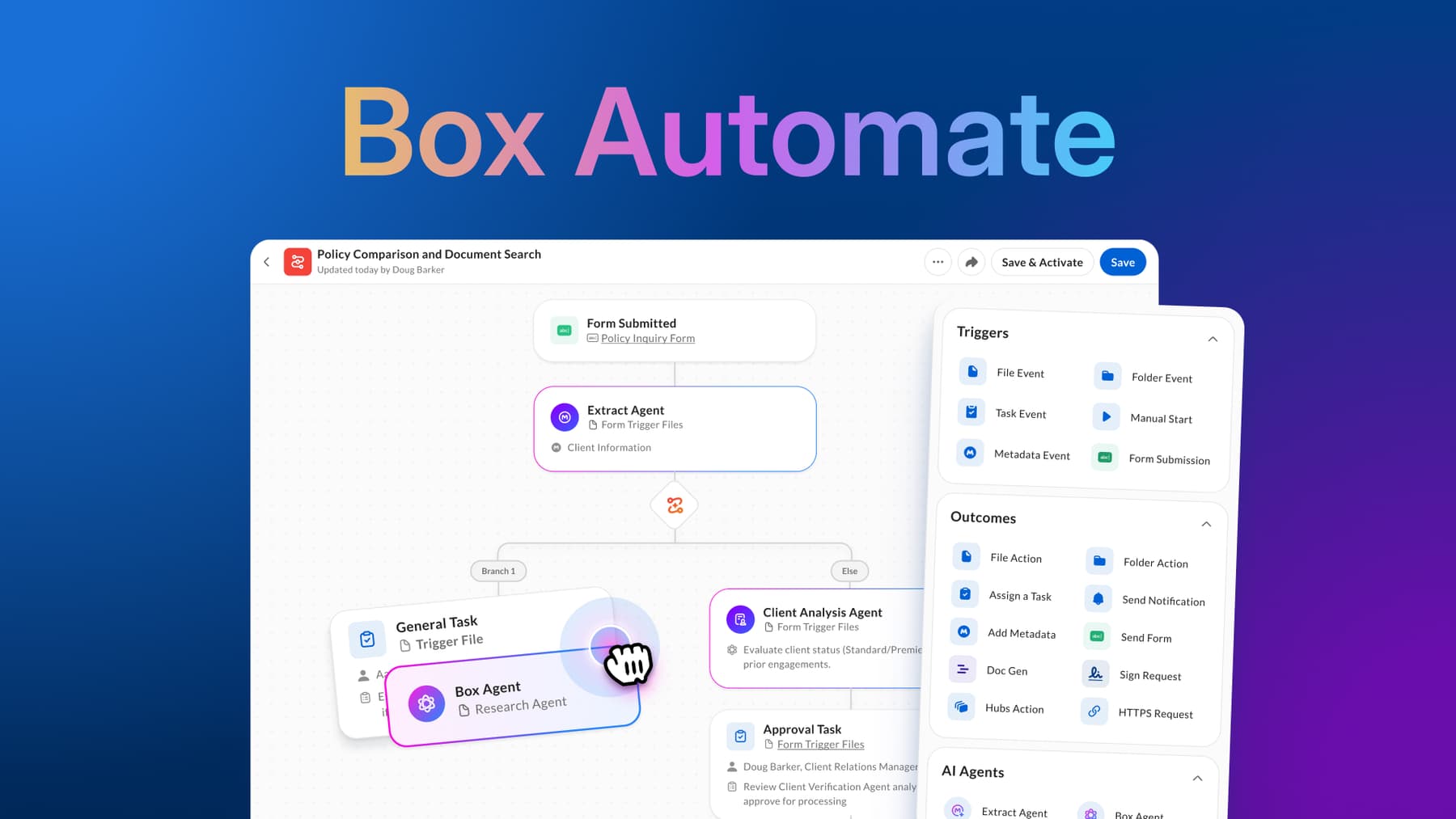
- With tools like Box Automate, businesses of all sizes can build AI automated workflows that combine multiple AI Agents in combination for extraction, reasoning, and task execution
What is AI workflow automation?
AI workflow automation is an approach to streamlining processes with minimal human input, leveraging AI. Organizations of all kinds can adopt this automation method to replace traditional rule-based systems, which follow fixed, predefined instructions to process data and trigger actions. These legacy systems often lack the ability to manage complex rules (like multiple dependencies) and process unstructured data, including PDFs, images, and business documents.


How AI-driven automation works
AI-based workflow automation works by processing and moving information between systems. Using machine learning (ML), natural language processing (NLP), and intelligent document processing, an AI-powered system can handle tasks such as analyzing the content of a resume and routing the document to the right recruiter, even if it doesn’t follow a standard format. You can also use these systems to pull information from invoices, sort customer support tickets, and route legal documents for review.
Take a look at the steps of a typical automated AI workflow.
- Input collection: AI systems pull information from your documents, forms, and images — you can also ask questions or make requests
- Data processing: AI then cleans the input (fixing typos or redundancies), categorizes documents for easier analysis, and interprets the request
- Decision-making: Based on rules or patterns it’s learned, the system decides the next step, which might be sending a personalized automatic message or routing a contract for internal review
- Task execution: The system takes over routine tasks with no manual input, so teams eliminate repetitive tasks like responding to customer service tickets
- Feedback loop and learning: Based on past results, the AI tool refines its accuracy, delivering better results over time
With the increased adoption of AI technologies, especially generative AI, and their potential for reshaping work dynamics, businesses are building AI workflows to make their processes more efficient and less error prone. The State of Intelligent Automation Report shows that 88% of organizations consider AI the key to successful automation, while 78% say productivity gains are the most important KPI.
Understand the importance of digital workflow automation for business operations.
What are the key components of AI workflow automation?
AI workflow automation goes beyond basic workflow systems, combining key components like AI technologies, business process automation tools, and APIs to connect platforms and applications.
If your goal is to streamline workflows, here’s a closer look at the elements you should look into.
| Basic components of AI workflow automation | Purpose |
| AI and automation technologies | AI workflow automation uses machine learning to improve performance with data, natural language processing to understand and generate text, robotic process automation (RPA) to handle repetitive tasks, and deep learning to solve complex problems like recognizing images or detecting patterns in text |
| Business process automation (BPA) | This broader practice automates entire processes within a business, laying the groundwork for how AI platforms trigger actions or make decisions |
| APIs | Application programming interfaces connect tools and data sources, so you can move information between systems — for example, transferring customer data from an online order form into your CRM system |
Benefits of AI-based workflow automation for businesses
Imagine a legal team summarizing a 50-page contract with a click and routing files to the right stakeholders without email back-and-forth. Contract approvals would be faster and free of all the usual hassle. From document reviews to project management workflows, every area of your organization can benefit from AI-powered automation.

Explore the main advantages of workflow automation powered by AI.
Increased business efficiency
When teams don’t waste time searching files and generating reports, they meet deadlines more easily. With AI-driven automation, you use AI agents to route information, process requests, and handle queries, even after hours, reducing turnaround times.
Improved data accuracy
Human error is a challenge in enterprise content management, especially when you handle a vast amount of unstructured data. By implementing an Intelligent Content Management platform with AI workflow tools, you standardize how you process information, eliminating the manual copy-paste.
Scalability
A modernAI workflow automation platform gives you flexible cloud storage capacity to scale operations based on demand. For example, if you run an e-commerce company, you can process more orders during peak periods without compromising accuracy.
AI-driven decision making
Beyond simply executing predefined tasks, AI workflow automation systems let you extract key data from your storage faster than you’d expect.
- Need to reference a report during a meeting? Ask questions related to its content.
- Searching for a contract clause? Use AI content discovery.
You can even pull up a quick customer profile to handle an urgent request without digging through files. In all these situations, you can use this content intelligence to extract more value from your business data and make timely, confident decisions.
Learn how to use AI for business.
Examples of automated AI workflows
Want to boost your workflow efficiency? Below are AI workflow automation examples you can integrate into your processes.
- HR onboarding: Use document generation to draft contracts and grant instant access to onboarding materials
- Electronic contract signing: Reduce the risk of inconsistencies and typos by quickly drafting and personalizing contracts based on metadata (the data about data)
- Customer onboarding: Create an automatic workflow with AI tools to process data from forms and trigger welcome messages or support requests, making your response to new clients more agile and enhancing their experience
- Document workflow automation: Categorize and send documents to the appropriate departments, whether it’s for review, analysis, or prompt action.
Learn more about how leading companies are using AI automation in the enterprise.
How to use AI-powered workflow automation in your business
Before advancing your AI workflow automation strategy, understanding key questions and emerging technologies like conversational AI and agentic AI can make a difference.
Follow these five steps to create a robust automated AI workflow for your business.
1. Identify critical workflows to automate
Start by identifying the most time-consuming tasks within your workflows. In a Box-sponsored survey conducted by ClearPath Strategies, 73% of top performers in content management have automated previously manual processes.
For example, you can implement AI-powered workflows like:
- Sentiment analysis to understand audience reactions
- Document generation for manuals, proposals, and FAQs
- Meeting follow-ups to align on next steps
Focus on AI workflows that involve large volumes of data or multiple handoffs. If you try to automate everything at once, you’ll overwhelm your teams and hinder the learning process.

2. Choose an AI workflow automation platform to meet the unique needs of your organization
The market is flooded with AI workflow builders, but they don’t all provide document audit trails to help you adhere to industry regulations. The platform you pick should align with your specific goals like improving speed and reducing compliance risk.
A Market Research Future forecast shows that cloud technology is closely linked to the increased adoption of AI workflow automation tools, along with low-code and no-code platforms, where you can develop customized AI-powered automation. These solutions help you analyze and process data at scale, regardless of the device, so make sure your solution is compatible with these advancements.
3. Integrate your AI workflow automation tool with existing systems
Use APIs or built-in integrations to connect your AI workflow tool with your online project management software, ERP system, or digital asset library. By keeping data flowing between systems, your teams save time and eliminate the burden of manually inputting data and checking for discrepancies.
4. Implement AI agents for workflow automation
Certain AI workflows need a human touch. For example, you shouldn’t approve copy for an entire campaign without the marketing manager’s sign-off. But AI agents for workflow automation can free up their time by reviewing the file for key information and catching potential inconsistencies in tone and voice.
According to a UiPath report, 52% of companies see the automation of complex workflows, which often involve multiple steps and systems, as a top benefit of agentic AI. With this technology, you create agents to act on your behalf, retrieving information and responding to requests.
For instance, in a healthcare workflow, AI agents can pull patient data from the data storage system to give patients instant answers about coverage and appointment policies in your patient portal.
5. Implement secure collaboration tools for AI-powered workflow automation
When an automated AI workflow depends on collaboration with suppliers, clients, or multiple departments, you’ll need strong data security policies to protect your valuable information from becoming vulnerable to breaches and privacy violations.
Secure collaboration tools offer shared workspaces for co-editing files and automate the hand-off process, reducing friction in multi-party workflows. The best AI workflow automation platforms let you set proper file and folder permissions and encrypt sensitive materials to safeguard collaboration without reducing work agility.

Simplify work through intelligent workflow automation with Box
To make the most of AI workflow automation, you need a solution that lets you work at the speed of business in the AI-first era. Box, the leader in Intelligent Content Management, equips 100K+ organizations with a flexible solution to tap into the potential of content in the age of AI.
Our platform empowers your team to create and orchestrate intelligent content workflows through:
- Workflow automation tools like Box Automate, where you can build and customize AI agents to handle complex, use case-specific tasks
- Data insights from your enterprise documents and images, powered by Box AI
- Automated document generation at scale with Box Doc Gen, so you can pull information from forms, metadata, and applications to fuel your workflows
- Our AI agent builder, Box AI Studio, where you select from trusted AI model providers to develop and implement an assistant in minutes
- Intelligent no-code applications via Box Apps, a secure way to speed up work by centralizing critical information for easy retrieval
Contact us to supercharge your business with intelligent workflow automation today.

While we maintain our steadfast commitment to offering products and services with best-in-class privacy, security, and compliance, the information provided in this blog post is not intended to constitute legal advice. We strongly encourage prospective and current customers to perform their own due diligence when assessing compliance with applicable laws.