In a recent post, we talked about enterprise knowledge bases becoming core infrastructure for AI agents. The short version: Agents need a trusted knowledge layer that’s shared, permission-aware, versioned, reviewable, and owned by the teams closest to the work.
This post is about the part that comes next: How does a new file become trusted enough for an agent to use?
It’s a straightforward idea, but this is where enterprise knowledge starts to drift. New client notes get uploaded. Templates get updated. Old decks stick around. Someone finds a useful file, but no one is sure whether it’s current or approved.
A good knowledge base needs a way to handle that intake and review loop.

The problem with “search everything”
A pattern we keep seeing with agent workflows: The context layer gets messy fast once real company content is involved.
Useful knowledge lives across folders, Slack threads, old decks, draft notes, client deliverables, pricing worksheets, onboarding docs, and one-off templates. Some files are current. Some are stale. Some were approved six months ago. Some were never reviewed at all.
If an agent can search everything, it can also find the wrong thing. An old scope deck. A draft discovery note. A template with outdated assumptions. A file that looks useful, but was never approved for reuse.
For a human, this is annoying. For an AI agent, it becomes a trust problem.
Trusted knowledge needs an intake process
A curated knowledge base needs more than a place to store approved files. It needs a way for new knowledge to enter, get reviewed, and become safe for agents to use.
That usually starts with a staging area.
A domain owner might have a new retail discovery note, an updated insurance onboarding checklist, or a financial services discovery template. The content may be useful, but the upload itself doesn’t make it trusted knowledge.
Before that file becomes part of the knowledge base, the team needs to answer a few basic questions:
- What domain does this belong to?
- Who owns it?
- Is it current?
- Has it been reviewed?
- Should agents use it for answers?
- Where should it live once approved?
This is the part that often gets handled informally today. Someone drops a file into a folder. Someone asks in Slack if it’s the latest version. Someone copies an old deck because it was easier to find.
Over time, the knowledge base starts to drift.
A simple workflow for curated knowledge
In the demo below, the workflow starts with a domain-based folder structure in Box.
Client work is organized by domain, with areas for retail, insurance, and financial services. Each domain has a staging folder for new or updated assets and an approved area for content that has gone through review.
A retail owner uploads a new discovery scope note into the retail staging folder. At that point, the file is available, but not yet trusted knowledge.
Claude connects to Box through the Box MCP server and reviews the staged asset. It summarizes the file, proposes metadata, recommends tags, identifies the right domain, assigns a content health score, and flags issues like missing owners, stale dates, duplicate guidance, or assumptions that need review.
Box Automate then kicks off the workflow when the file lands in staging. It can route the asset to the right reviewer, create the approval task, and move the content forward based on the decision.
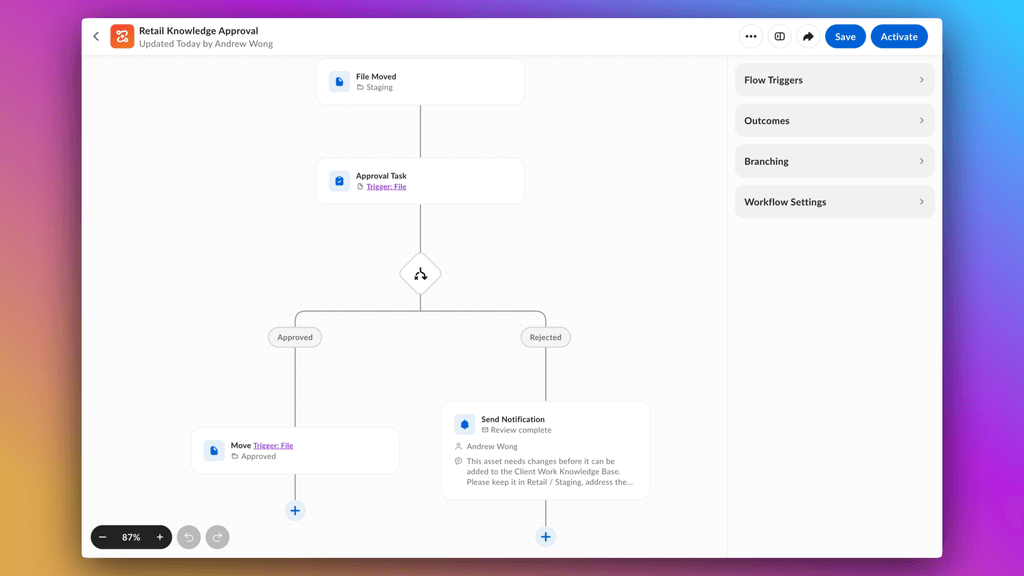
If the domain owner approves it, the file becomes part of the curated knowledge base in a Box Hub. If it needs changes, it stays out of the trusted layer.
The Hub becomes the trusted destination
Once content is approved, it needs a place where both people and agents can find it.
A Box Hub can act as the curated knowledge base for a specific domain or workflow. Instead of asking agents to search across every file a company has, teams can point them at a smaller set of approved, governed, source-backed content.
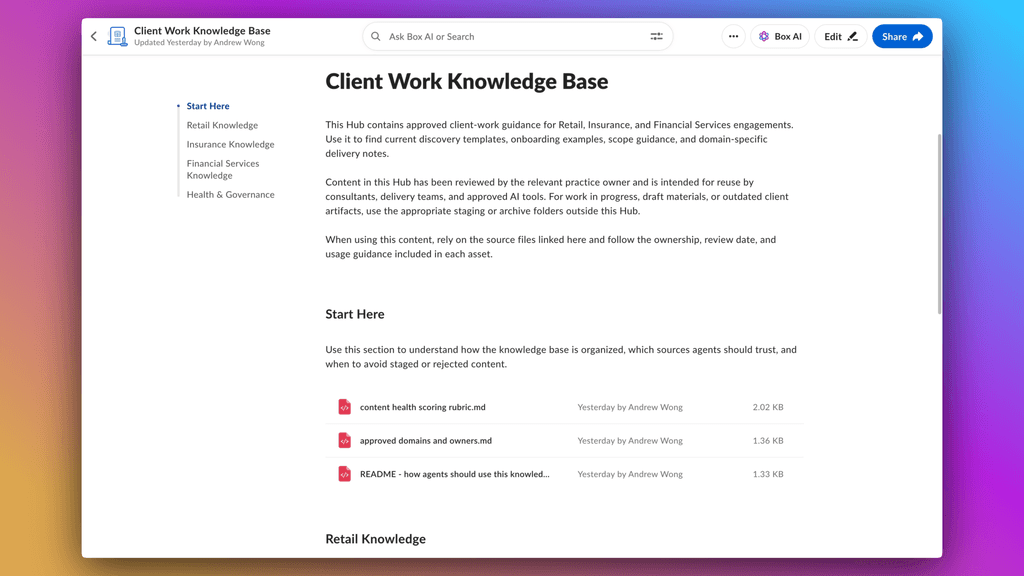
For example, a retail knowledge base might include current discovery templates, approved scope guidance, onboarding examples, and content health reports. The staged notes, old decks, archived files, and rejected assets stay outside of that trusted surface.
That distinction matters.
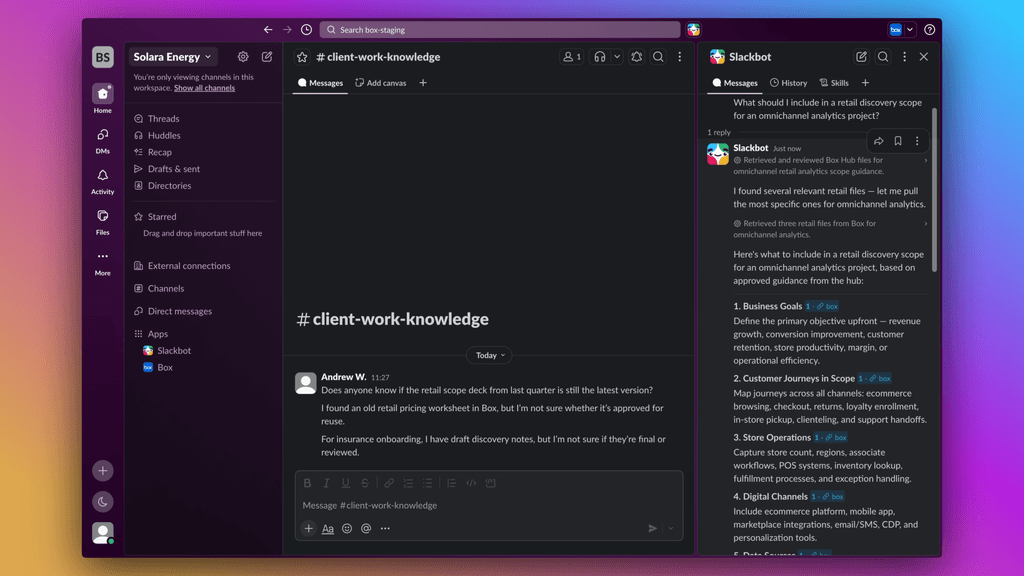
When someone asks in Slack, “What should I include in a retail discovery scope for an omnichannel analytics project?”the agent can answer from the approved retail knowledge base and cite the source files. It’s not guessing from a random mix of search results, but using content the team has reviewed and published for reuse.
The knowledge base has to stay healthy
The longer-term goal is to create a loop that keeps the knowledge base useful.
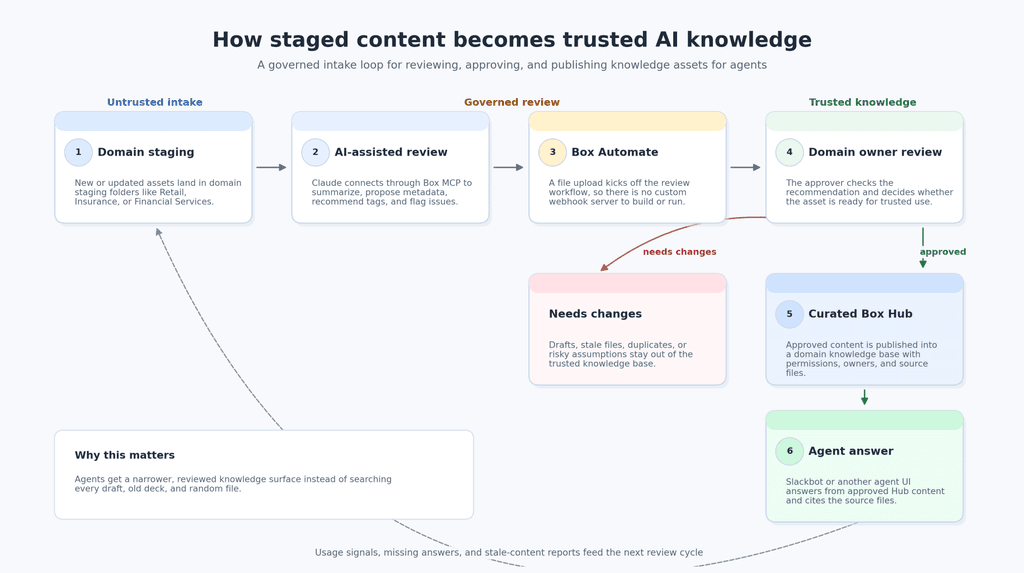
New content enters staging. An agent helps review and structure it. A workflow routes it to the right owner. A human approves or rejects it. Approved content lands in the Box Hub. Agents use that Hub in real workflows. Gaps and stale content become signals for the next review cycle.
That loop is what turns a folder of files into a knowledge base agents can actually depend on.
It also gives developers a cleaner architecture for agent workflows:
- Box stores the content, permissions, versions, and source files
- Box MCP gives agents a way to work with that governed content
- Box Automate handles the event-driven workflow when new files arrive
- Box Hubs provide the curated destination for approved knowledge
The agent experience can happen in Slack, a chat app, an internal tool, or wherever the team is already working. The important part is that the answer comes from a trusted knowledge layer.
As more teams build agent workflows, the quality of the context layer will matter more. Agents need access to content, but they also need signals about what content is current, approved, and safe to use.
The companies that get this right will not just have more files connected to AI.
They will have a better way to turn everyday work into trusted knowledge.