Enterprise procurement documents rarely contain just a few flat fields. A supply agreement can include vendor contact details, delivery milestones, ship-to locations, payment terms, and operational commitments, often spread across paragraphs and tables.
That is where the new struct and table field types in Box AI structured extraction become especially useful.
With these field types, you can define a schema that matches the shape of the document more closely. For procurement workflows, that means a supplier agreement stored in Box can be turned into structured output that’s ready for downstream systems, automations, and Box metadata.
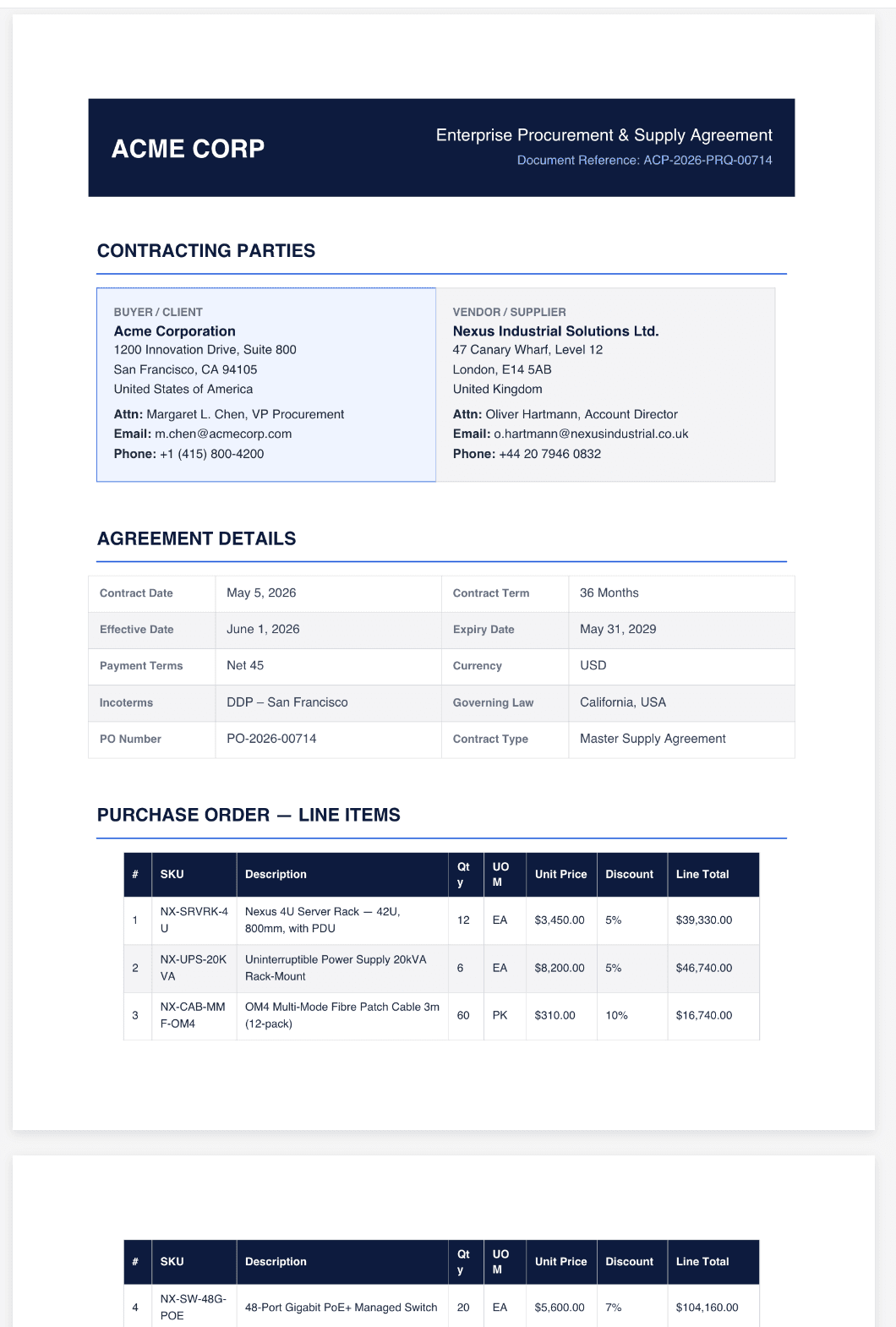
Here’s a sample document, for demo purposes. It’s a two-page sample vendor agreement with a lot of details.
Using struct for grouped data
A struct field is useful when the extracted data belongs together as one nested object. In a procurement agreement, vendor information is a good example. The vendor’s legal name, address, country, contact person, email, and phone number are all related fields, and it makes sense to keep them grouped under one parent field instead of flattening them into separate top-level values. In the sample request, that grouped field is vendor_name.
So the API call would be the following. Please note that for better results it’s recommended to use the enhanced_extract_agent.
{
  "items": [
    {
      "id": "YOUR_FILE_ID",
      "type": "file"
    }
  ],
  "fields": [
    {
      "key": "vendor_name",
      "displayName": "Vendor name",
      "description": "Vendor or supplier identity and contact details.",
      "prompt": "Extract the vendor or supplier details: legal name, full mailing address (address lines, city/state/postal, country), attention/contact name and title, email, and phone.",
      "type": "struct",
      "fields": [
        { "key": "legal_name", "displayName": "Legal name", "type": "string" },
        { "key": "address_line_1", "displayName": "Address line 1", "type": "string" },
        { "key": "address_line_2", "displayName": "Address line 2", "type": "string" },
        { "key": "city_state_postal", "displayName": "City, state, postal", "type": "string" },
        { "key": "country", "displayName": "Country", "type": "string" },
        { "key": "attention", "displayName": "Attention", "type": "string" },
        { "key": "email", "displayName": "Email", "type": "string" },
        { "key": "phone", "displayName": "Phone", "type": "string" }
      ]
    },
    "ai_agent": {
      "type": "ai_agent_extract_structured",
      "id": "enhanced_extract_agent"
    }
}
In the response, Box AI returns it as a nested object:
{
    "answer": {
        "vendor_name": {
            "legal_name": "Nexus Industrial Solutions Ltd.",
            "address_line_1": "47 Canary Wharf, Level 12",
            "address_line_2": null,
            "city_state_postal": "London, E14 5AB",
            "country": "United Kingdom",
            "attention": "Oliver Hartmann, Account Director",
            "email": "[email protected]",
            "phone": "+44 20 7946 0832"
        },
       "ai_agent_info": {
        "processor": "basic_text",
        "models": [
            {
                "name": "google__gemini_2_5_pro",
                "provider": "google"
            }
        ]
    },
    "created_at": "2026-05-14T01:21:11.778-07:00",
    "completion_reason": "done"
}
That structure is important because it mirrors how this data is actually used. Instead of parsing one long vendor block after extraction, developers can map the result directly into a supplier master record, vendor onboarding workflow, CRM entry, or procurement system.
For Box customers, this can be a practical first step in automating supplier intake. The extracted vendor object can be pushed into an ERP or procurement platform, or written back to Box metadata to make agreements easier to search and route.
Using table for repeating rows
A table field is useful when the document contains repeated entries that should be returned as a list of rows. In a supply agreement, the delivery schedule is a strong example. Each milestone has the same shape: phase, items, delivery date, destination, and status. Instead of collapsing all of that into one string, Box AI can return a structured array.
In the sample request, that repeating field is delivery_schedule.
{
    "items": [
      {
        "id": "YOUR_FILE_ID",
        "type": "file"
      }
    ],
    "fields": [
      {
        "key": "delivery_schedule",
        "displayName": "Delivery schedule",
        "description": "Each delivery milestone row.",
        "prompt": "Extract one row per delivery milestone: milestone or phase, items/scope, delivery date, delivery address, and status.",
        "type": "table",
        "fields": [
            { "key": "milestone", "displayName": "Milestone / phase", "type": "string" },
            { "key": "items", "displayName": "Items", "type": "string" },
            { "key": "delivery_date", "displayName": "Delivery date", "type": "string" },
            { "key": "delivery_address", "displayName": "Delivery address", "type": "string" },
            { "key": "status", "displayName": "Status", "type": "string" }
        ]
      }
    ],
    "ai_agent": {
        "type": "ai_agent_extract_structured",
        "id": "enhanced_extract_agent"
    }
}
In the response, Box AI returns it as a list of objects:
{
    "answer": {
        "delivery_schedule": [
            {
                "milestone": "Phase 1 - Infrastructure",
                "items": "Server Racks (qty 6), UPS (aty 3)",
                "delivery_date": "July 15, 2026",
                "delivery_address": "Acme Corp Data Centre 350 East Cermak Rd, Chicago IL 60616 United States",
                "status": "Scheduled"
            },
            {
                "milestone": "Phase 2 - Networking",
                "items": "48-Port Switches (all), Fibre Cables (all)",
                "delivery_date": "August 1, 2026",
                "delivery_address": "Acme Corp Data Centre 350 East Cermak Rd, Chicago IL 60616 United States",
                "status": "Scheduled"
            },
            {
                "milestone": "Phase 3- Security",
                "items": "NGFW Cluster (all), Remaining Racks",
                "delivery_date": "August 20, 2026",
                "delivery_address": "Acme Corp HQ 1200 Innovation Drive San Francisco CA 94105",
                "status": "Pending"
            },
            {
                "milestone": "Phase 4 - Services",
                "items": "Installation, Training",
                "delivery_date": "Sep 1-5, 2026",
                "delivery_address": "Acme Corp HQ 1200 Innovation Drive San Francisco CA 94105",
                "status": "Pending"
            }
        ]
    },
    "ai_agent_info": {
        "processor": "basic_text",
        "models": [
            {
                "name": "google__gemini_2_5_pro",
                "provider": "google"
            }
         ]
    },
    "created_at": "2026-05-14T01:21:11.778-07:00",
    "completion_reason": "done"
}
This is the key difference from struct. A struct field returns one grouped object. A table field returns multiple rows with the same schema. That makes the table especially useful for delivery milestones, line items, service levels, payment schedules, or any repeated block of operational data that needs to be tracked over time.
This opens up very practical next steps. The extracted delivery schedule can be pushed into a project tracker, procurement dashboard, ERP workflow, or ticketing system. It can also trigger reminders, follow-up tasks, or downstream approvals based on milestone dates and status.
Remember, that the enhanced extraction agent is not strictly required, but it produces much better results for richer schemas and more complex document layouts, especially when nested and repeating fields are involved.

What’s your use case?
Overall, this enhancement reduces post-processing and makes the extracted output much easier to connect to real workflows like loan origination, lease agreements, medical records processing, and much more. We believe that this will truly unlock the potential of your unstructured data. So, what’s your use case?
Resources:
Read the tutorial: Extract metadata from file (structured)
API reference: POST /2.0/ai/extract_structured