This was originally published as an X article on September 14, 2026. See it here.
What if a writing assistant could help at the exact moment you need it without waiting for a prompt and enhancing your creative flow?
A recent paper, Designing Proactive Thought Partners for Writing, explores this idea through proactive AI writing support with configurable thought partners. Research was conducted by Cornell University in partnership with Google DeepMind. The paper moves beyond the typical question ('Can AI generate text for me?') to ask how AI can offer higher-level support at key moments such as providing a fresh perspective, suggesting a concrete example, or prompting a check on an important claim. This concept is visualized by the graph from the quoted research paper:
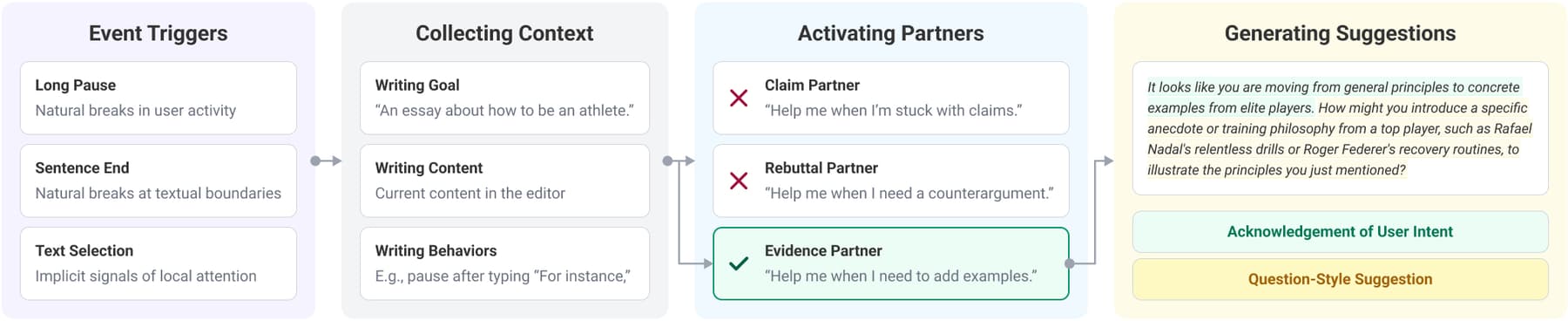
“When an event trigger (e.g., a pause, sentence end, or text selection) occurs, the system gathers contextual information about the writer’s session goal, current text, and writing behaviors, including keystroke logs. It then evaluates the user-defined contextual criteria of all enabled partners and activates the partner or partners, if any, whose criteria best match the current situation. Each activated partner generates a suggestion that includes both an acknowledgment of the inferred user intent and a question-style suggestion based on its role.”
That idea offers a simple way to counter cognitive surrender. A longer pause in writing represents a natural opportunity for guidance. The AI does not need to rewrite the draft; it can simply ask one targeted question and let the writer decide how to proceed. In this demo project, I turned that idea into a small Box application. It loads a Markdown document from Box, watches for a pause in writing, sends the document to Box AI with a configurable partner role, and displays one document-grounded suggestion beside the draft. The implementation is intentionally small: one Node.js server, one browser page, and a few Box API calls.
What does the demo app include
The app includes a minimalistic web app where the user can choose a writing partner persona like Evidence, Counterpoint, or Clarity, trigger frequency, and LLM from a dropdown menu covering supported Box AI API models.
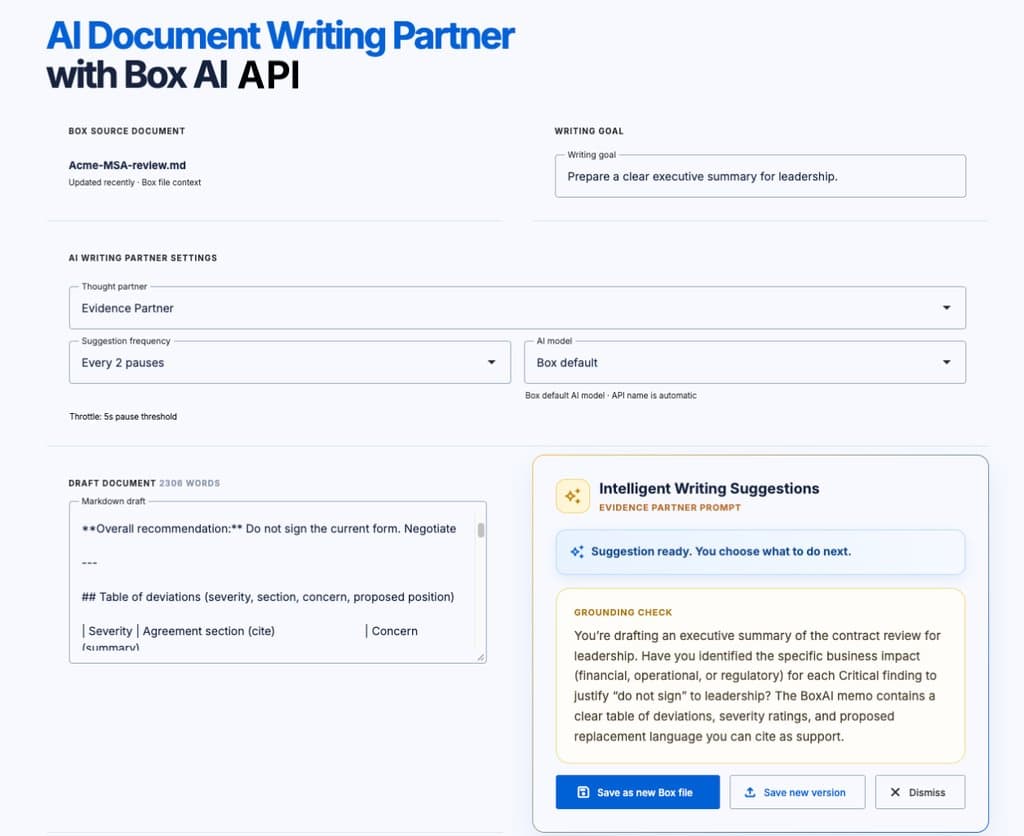
An example suggestion for the Evidence Partner can be: "Which specific metric or source supports this claim?". The Counterpoint Partner can challenge an assumption, while the Clarity Partner can ask for a concrete example when a paragraph becomes abstract. The application sends the source file as a Box AI item and sends the current draft as part of the prompt. Box AI supports single-file questions through `mode: "single_item_qa"`. The request can also include citations and an optional AI model override, for context see the
Box AI API “Ask questions” guide. The flow is intentionally lightweight: once the writer pauses, the browser triggers a request at the chosen interval. Next, the Node.js server constructs a persona-specific prompt combining the source file and the active draft. When Box AI returns a suggestion, it appears adjacent to the text area. The writer can then dismiss the prompt or incorporate it into their draft.
Once the writer is ready the content can be either saved as a new Markdown file, leaving the original Box file unchanged or save a new version of the original file, so the changes are tracked overtime. The implementation uses Box’s upload file version endpoint for the second option.
Run the sample app
In order to run this sample app there are a few project prerequisites including:
- Node.js 18 or later installed on your machine,
- Box free developer account,
- Box app developer token with access to the Box AI API (ai.readwrite scope is enabled by default in your first default Box app for the free developer account),
- file ID of that Markdown document in Box that the application can read. See how to find the necessary values in Box
Box developer tokens are short-lived and are intended for development and testing; for a production app, use an appropriate OAuth or server-side authentication flow. See the Box AI prerequisites, developer token guide and Box scopes reference.
Next, clone the demo project and install the dependencies.
npm installCreate a .env file and configure the environment variables.
BOX_ACCESS_TOKEN=your_box_developer_token
BOX_FILE_ID=your_markdown_file_id
PORT=3000
Start the server and open the local host.
npm startWhat does the Box AI request look like
Under the hood the server calls the Box AI Ask endpoint with the source file ID, the current draft, and the selected model when one is chosen:
{
  mode: "single_item_qa",
  items: [{ id: boxFileId, type: "file" }],
  prompt,
  include_citations: true,
  ai_agent: {
    type: "ai_agent_ask",
    basic_text: { model: "openai__gpt_5_6_sol" }
  }
}
The model names come from Box’s supported AI models from various providers. You can also explore a visual interface for creating the JSON configuration for this API requests.
The prompt for this MVP includes the variables included in the UI to provide the customized guidance:
const prompt = `
You are the ${partner.name} in a writing environment.

Partner role: ${partner.role}
Contextual rule: ${partner.heuristic}
Writer's goal: ${limitPromptText(goal || "Help me develop this document.", 1000)}
Trigger: ${trigger || "long pause"}

Current draft context:
${limitPromptText(draft, 6000)}

Decide whether an intervention is useful now.
If it is not useful, respond exactly with NO_SUGGESTION.
If it is useful, respond with:
1. One short acknowledgement of what the writer appears to be doing.
2. One concise, non-directive question that helps the writer think.
3. If the Box document contains relevant support, mention it briefly.
Do not rewrite the draft and do not give more than one question.
`.trim();
Preserving the writer’s agency
Writing is a universal skill across every role and discipline. It gives structure to thought, clarifies ideas, and facilitates communication. That is why proactive, question-based assistance feels far more natural than passive prompt-and-generate workflows. By combining contextual grounding with non-intrusive nudges, developers can build tools that preserve writer agency while meaningfully improving writing quality. This MVP leaves room for extensions such as replacing developer tokens with OAuth 2.0, integrating a full rich-text Markdown editor, and allowing writers to define custom partner personas and timing rules. Box manages file versioning, Box AI supplies the reasoning layer, and the writer's process is augmented rather than replaced.