Content workflow management is the structured system a team uses to plan, create, review, approve, publish, distribute, and evaluate content. It connects people, tasks, deadlines, files, approvals, automation, and performance data, so that work moves through a repeatable process instead of relying on memory or manual follow-ups.
As Aaron Levie, CEO and Co-Founder of Box, explained during a keynote address: "The history of computing has been defined by automating all of these structured data workflows. But that's really only about 10% of our data in an enterprise... The vast majority of this work deals with unstructured data. It's working on engagement campaigns. It's providing health care services. It's processing benefits and claims… think about all of that data that goes into these workflows. It's all unstructured." Bringing automated pipelines to this remaining 90% of business content is where the next leap in enterprise productivity occurs.
This guide covers the roles, stages, workflow models, automation capabilities, integrations, feedback loops, and tools that are required to build a predictable content operation.
Key takeaways for managing content workflows
- Content workflow management defines how content moves from ideation and planning through creation, review, approval, publishing, distribution, and performance analysis
- Task-based workflows organize production around fixed actions and dates, while status-based workflows track where each asset sits in its lifecycle
- Mandatory review and approval checkpoints help maintain brand consistency and reduce the risk of publishing inaccurate, outdated, or noncompliant content
- Automation can route drafts, notify reviewers, send deadline reminders, advance approved assets, schedule publication, and initiate reporting workflows
Why structured content workflows matter
Without a defined workflow, content can stall in unresolved comments, incomplete briefs, scattered chat messages, or unclear approval queues. The underlying problem usually isn’t a lack of effort. It’s the absence of a system that captures effort, assigns ownership, and routes work to the next responsible person.
For knowledge workers and content teams, workflow management reduces time spent chasing updates, reconciling file versions, and locating feedback. Writers, editors, designers, strategists, project managers, and analysts can see what’s expected, when it’s due, and what has to happen next.
IT, security, legal, and compliance leaders have different needs. For them, structured workflows create consistent checkpoints around access, review, approval, retention, and publication. This is especially important in regulated sectors like finance and healthcare, where inaccurate or poorly worded claims can have serious consequences.
Securing automated content processes requires moving beyond basic boundary defenses to granular content inspection. As Manoj Asnani, Box Vice President for Product Management for Security & Compliance, observed, "Traditional security tools are built for the network and identity layer, not for what an agent is being told to do inside a document." Embedding security controls directly into the content workflow guarantees that permissions, privacy rules, and data handling policies are enforced at every interaction point.
A scalable workflow also improves decision-making. When production status, content context, and performance data remain connected, teams can identify bottlenecks, allocate resources more effectively, and use results from published content to guide the next planning cycle.
Core concepts in content workflow management
What does content workflow management include?
Content workflow management is the operating structure behind content production.
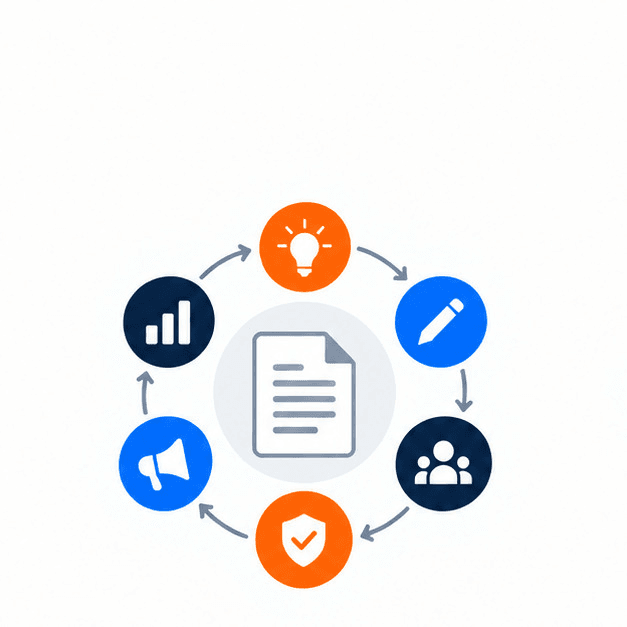
The full content lifecycle of a content workflow system includes:
- Ideation and planning
- Content creation
- Review and editing
- Approval and publishing
- Distribution and promotion
- Performance analysis
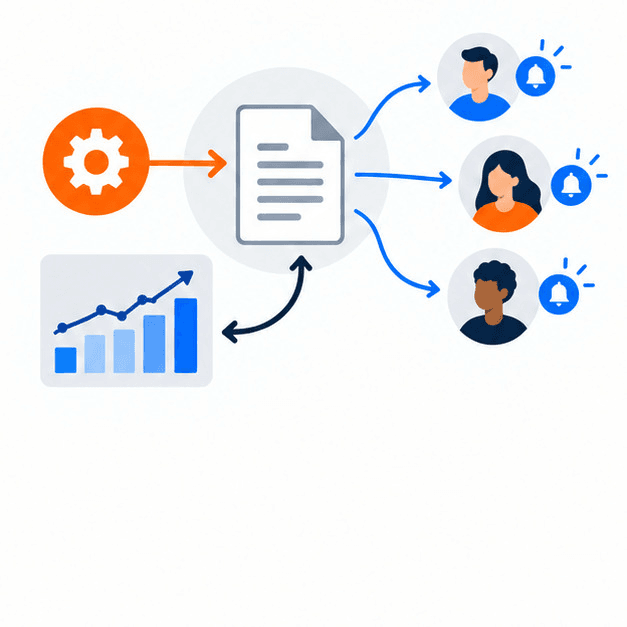
In a manual process, each participant in content creation must remember to notify the next teammate. In a managed workflow, marking a draft as ready can route it to an editor, notify the required reviewers, update the asset’s status, and make its progress visible to the project manager.
This makes production faster and more predictable. Templates, style guides, defined owners, and built-in checkpoints also help preserve tone, formatting, and quality as teams add contributors, channels, and content formats.
Roles and responsibilities in a content workflow
A content workflow depends on people performing clearly defined functions.
These responsibilities generally fall into four groups:
- Strategic roles
- Content creation roles
- Approvals
- Distribution and performance analysis
Strategic roles in content planning
Strategic roles establish why a piece of content should exist, who it should reach, and which business outcomes it should influence. A content strategist or chief content officer commonly sets this direction.
Content managers translate strategy into daily operations by maintaining the editorial calendar, tracking deadlines, and monitoring deliverables. Project managers bridge strategy and execution by assigning work, allocating resources, and maintaining realistic timelines.
Content creation roles and responsibilities
Creation roles turn briefs into usable content assets.
Some examples of content creation roles include:
- Writers producing articles, scripts, social copy, or product content
- Designers creating visuals that support the message
- SEO specialists improving structure and keyword targeting
- Other specialists producing formats such as videos, podcasts, or case studies
Creators need access to the same approved brief, research, reference materials, visual direction, templates, and brand guidance. Centralized context reduces rework and prevents contributors from acting on outdated instructions.
Who reviews and approves content?
Editors and proofreaders improve language, structure, tone, clarity, and consistency. Technical or specialized content may also require subject-matter experts to confirm accuracy.
Final approval may involve stakeholders outside the content team, including:
- Department leaders
- Legal reviewers
- Compliance teams
- Product owners
- Brand or marketing leaders
Structured sign-off makes review mandatory. It also creates a clear record of what was reviewed, what changed, and who authorized publication.
Distribution and performance analysis roles
After content gains approval, social media managers, email marketers, web teams, or other channel owners manage its distribution. Analysts then measure outcomes like reach, engagement, search performance, and conversions.
These findings should return to strategists and creators as feedback which closes the loop between production and performance.
How task-based content workflows work
A task-based workflow assigns fixed actions to fixed dates. Each task has a defined start and end, making the production timeline visible from the beginning.
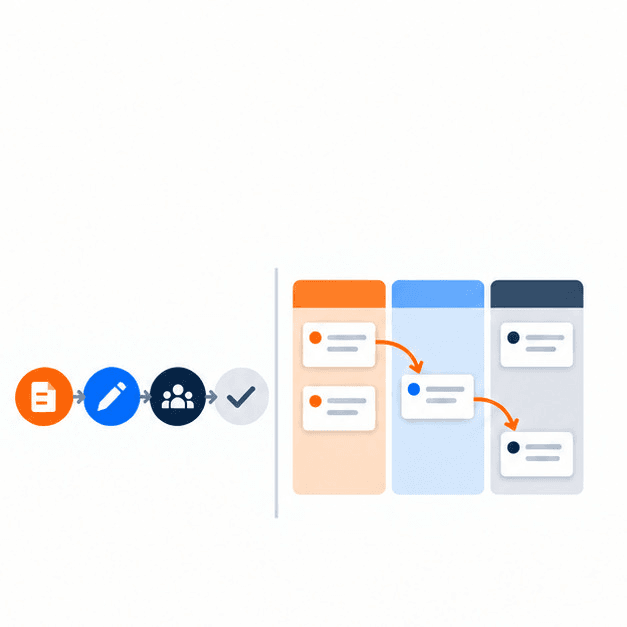
A typical sequence might be:
- Day 1: The strategist finalizes the brief, audience, goals, and target keywords
- Day 3: The writer submits the first draft
- Day 5: The editor reviews structure, accuracy, and tone
- Day 6: Stakeholders provide final sign-off
- Day 7: The content is published
- Day 8: Promotion begins
The main advantage of this schedule is its predictability; contributors know when their work begins and ends, while managers can balance workloads across multiple campaigns.
On the other hand, this system’s main risk is fragility; because each task depends on the previous step, one missed deadline can create cascading delays. Task-based workflows therefore require early warnings and clear communication when a dependency is at risk.
Status-based content workflows, explained
A status-based workflow tracks where an asset sits in its lifecycle rather than relying primarily on fixed dates.
Common statuses include:
- Backlog
- In progress
- Research
- Writing
- Review
- Approved
- Published
This model provides more flexibility when priorities change or work pauses. Managers can identify bottlenecks by seeing where assets have accumulated, such as a large number of drafts waiting for review.
High-volume teams producing lots of blog posts, landing pages, or social campaigns often use status-based workflows because they support fast feedback cycles. However, status labels still need defined owners and transition rules. Otherwise, work can remain in one stage indefinitely.
Sequential vs. parallel, status-based, and rule-driven workflows
Task-based and status-based models can be combined with broader workflow patterns:
- Sequential workflows move through steps one at a time
- Parallel workflows allow multiple activities like design and copy review to happen simultaneously
- Status-based workflows track progress through defined lifecycle stages
- Rule-driven workflows trigger actions when specified conditions are met
The right model depends on content complexity, production volume, risk, and the number of stakeholders involved. A regulated white paper may require a sequential approval chain, while a fast-moving social campaign may use parallel production and automated routing.
How automation routes content through workflows
Automation keeps content moving without requiring people to initiate every handoff manually. A rule-driven workflow uses triggers and conditions to determine what happens next.
A basic automated sequence can work as follows:
- A writer marks a draft as ready
- The workflow changes its status to review
- The assigned editor receives a notification
- An approaching deadline generates a reminder
- Approval advances the asset to publishing
- Publication triggers distribution or reporting tasks
- Analytics data flows into a shared dashboard
Human review remains important. Automation should coordinate work and reduce administrative effort without bypassing editorial, legal, compliance, or brand checkpoints. Blending autonomous AI actions with deliberate human oversight ensures that critical checks are never bypassed.
Matt Tyrrell, Director of Product Management on Box's AI team, offers an example that highlights this workflow dynamic. "With Box Automate, you can build these workflows and you can integrate agents to different steps of those workflows. So those custom agents that you created in AI Studio, you can insert them to make decisions along this workflow and keep you in the loop as things are going. And this really enables scale."
Embedding these checkpoints directly into workflow design allows organizations to scale automation without sacrificing oversight or control.
Connecting content systems through integrations and data synchronization
Integrations allow information and content to move among systems without repeated manual entry.
A content workflow may connect:
- Content repositories and collaboration tools
- Project and task management systems
- Content management systems
- Digital asset libraries
- Chat and notification platforms
- Analytics and reporting dashboards
For example, integrating a CMS with analytics tools like Google Analytics can keep reporting centralized instead of spread across separate reports. Synchronization also reduces the risk that one system contains an outdated status while another reflects the current state.
Building feedback loops for continuous content improvement
A content workflow shouldn’t end at publication. Internal and external evidence need to flow back into planning.
Internal feedback can include:
- Writers, editors, and designers reviewing the effectiveness of collaboration
- Managers identifying missed handoffs or unrealistic deadlines
- Brand, legal, and compliance reviewers documenting recurring issues
- Project teams identifying unnecessary steps or approval bottlenecks
External feedback includes audience behavior and performance data. Combining both types of feedback lets teams improve templates, briefs, review criteria, routing rules, distribution plans, and content strategy.

Essential tools for content workflow management
Project and task management tools
Project management tools break large initiatives into trackable tasks with owners and due dates, helping managers identify stalled work before it affects the launch.
Comments, notes, and files should stay associated with the relevant task in order to prevent feedback from disappearing into email threads or unrelated chat conversations.
Content creation and collaboration tools
Collaboration tools allow contributors to work from a shared version of an asset. This reduces version confusion and makes it easier to keep guidance, comments, and revisions connected to the content.
A consolidated view of assets in writing, design, review, or approval also reduces the need for manual status requests.
Workflow automation and integration tools
Workflow automation tools route work, notify stakeholders, trigger reminders, update statuses, and launch downstream actions. Integrations allow the content repository, CMS, analytics systems, and communication tools to exchange information.
Nontechnical teams may use no-code automation platforms to define triggers and conditions. More complex workflows can use platform APIs and custom integrations.
Content analytics and reporting tools
Analytics and reporting tools turn publishing and workflow activity into useful insight, revealing which formats underperform, which channels generate meaningful outcomes, and where the production process slows down.
Over time, this evidence will help teams allocate resources and make fewer decisions based solely on intuition.
How Box approaches content workflow management
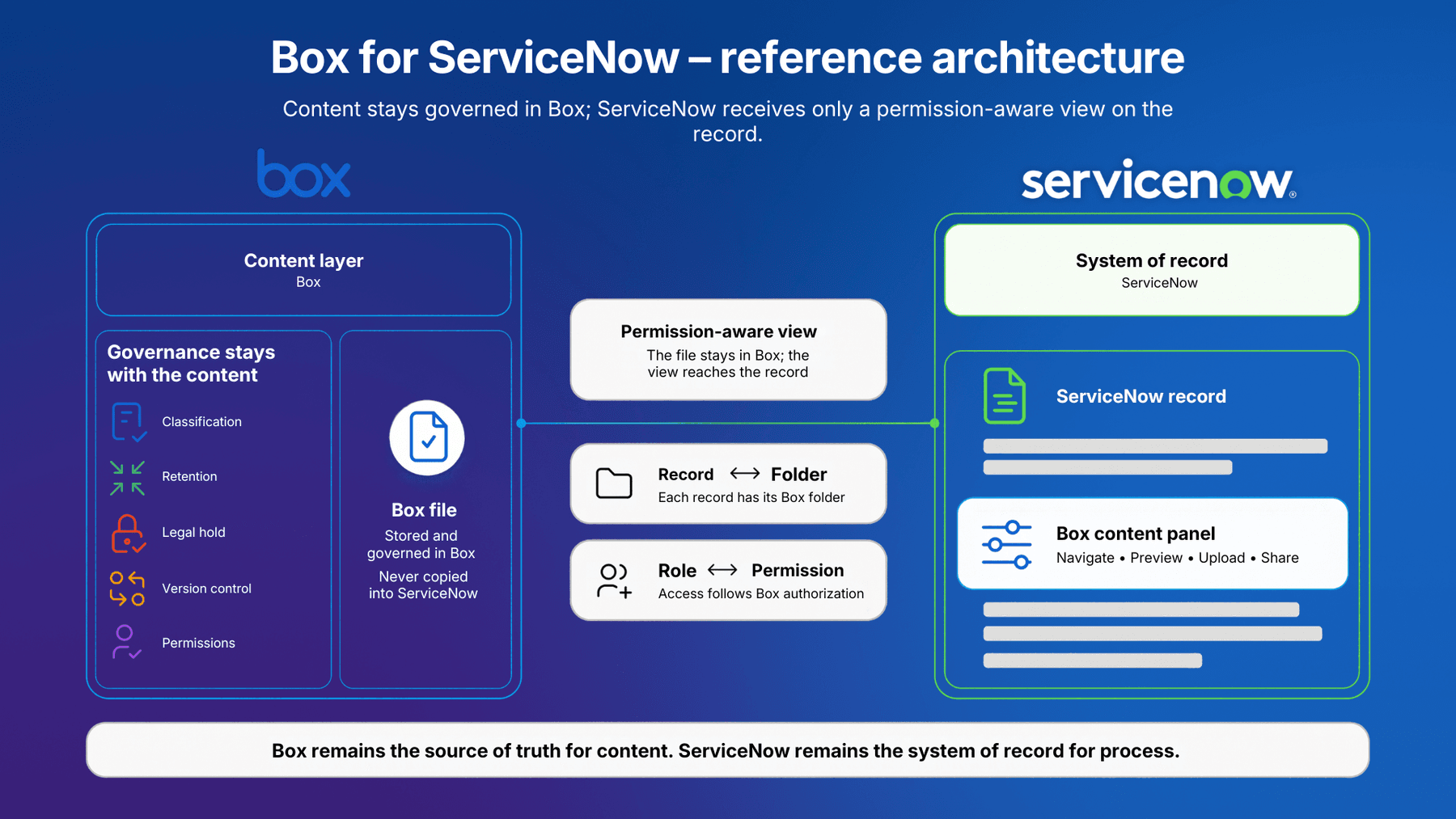
Box views content workflow management as a secure content lifecycle journey that extends beyond task tracking. The content itself, including briefs, drafts, designs, contracts, approvals, published assets, and performance reports, should remain connected to the people, policies, and processes that govern it. Fragmenting that content across a dozen tools makes a single source of truth nearly impossible to maintain.
Box provides a central content layer for storing, sharing, collaborating on, and managing content across its full lifecycle. This supports the vision that content workflow management should connect ideation, creation, review, approval, distribution, and performance analysis as one continuous system instead of a series of isolated handoffs. Centralizing content reduces version confusion and keeps comments, source files, reference materials, and approved assets connected rather than scattered across separate systems, addressing the “single source of truth” problem that makes task-based and status-based workflows fragile when files live in multiple places at once.
Box Notes and Box Canvas support the ideation and planning stage described in the Core concepts section, giving strategists and content managers a shared space for briefs, research, and campaign direction before work moves into production.
Box Hubs address the recurring challenge that creation roles need access to the same approved brief, templates, style guides, and reference materials. A hub can serve as a curated destination for that shared context, so writers, designers, and SEO specialists work from current guidance rather than outdated versions.
Box Relay maps directly to rule-driven and status-based workflow automation. Content can be routed for review, assigned to the right reviewer, and advanced automatically as it moves from draft to approved to published. This reduces the manual chasing that task-based workflows are especially prone to when a single handoff is missed.
Box AI supports the review and editing stage by helping authorized people summarize drafts, answer questions about content, and accelerate first-pass work. As Matt Tyrrell, Director of Product Management on Box's AI team, explains, these tools work "with a human in the loop, so that you can have the confidence that this is going right."
AI-assisted drafts and summaries still require editorial, brand, legal, or compliance review before advancing. Automation should coordinate work, not bypass required checkpoints.
Box Shield and Box Governance support the review and approval roles that legal, compliance, and brand stakeholders play, applying access controls, threat detection, and retention and disposition policies to drafts, confidential campaign plans, and final assets throughout the workflow.
Box Sign supports the approval and publishing stage when a workflow requires a documented electronic signature instead of an informal sign-off, such as for content-related agreements or releases.
Box Doc Gen and Box Apps support structured content generation and purpose-built experiences built around content-centric processes.
Box Platform and APIs connect Box-managed content to the project management systems, publishing platforms, communication tools, and analytics services referenced throughout the integrations discussion above.
Together, these capabilities connect the core workflow concepts of centralized content, clear collaboration, automated routing, human approval, secure access, governance, and system integration, keeping content and its surrounding process connected from planning through publication and analysis.
Content workflow management FAQs
What is content workflow management?
Content workflow management is the structured system used to plan, create, review, approve, publish, distribute, and measure content. It defines responsibilities, handoffs, statuses, deadlines, approval requirements, and the rules that move work from one stage to the next.
How is a content workflow different from content workflow management?
A content workflow is the sequence of steps followed by an individual asset or campaign. Content workflow management is the broader discipline of designing, operating, measuring, automating, and improving those workflows across a team or organization.
What are the five basic stages of a content workflow?
A common five-stage model consists of planning, creation, review, approval, and publication. More complete content lifecycle models treat distribution and performance analysis as additional stages because publishing alone does not ensure that content reaches an audience or produces useful insight.
What are the seven steps in the content creation process?
A common seven-step content creation sequence is research, ideation, planning, writing, editing, approval, and publishing. Teams may add distribution and performance analysis when managing the complete lifecycle rather than creation alone.
What are the four main types of workflow management?
The four major workflow types are sequential, parallel, status-based, and rule-driven. Sequential workflows move one step at a time, parallel workflows allow simultaneous work, status-based workflows track lifecycle stages, and rule-driven workflows trigger actions when defined conditions are met.
How do task-based and status-based workflows differ?
Task-based workflows assign actions to specific dates, making deadlines and dependencies predictable. Status-based workflows show where content sits in its lifecycle, providing more flexibility when priorities shift or production involves rapid feedback.
Does workflow automation eliminate the need for human review?
No. Automation can route drafts, notify reviewers, issue reminders, update statuses, publish approved material, and initiate reporting, but it shouldn’t bypass required editorial, subject-matter, legal, compliance, or brand reviews.
What tools do teams need for content workflow management?
Most teams need tools for project management, content creation and collaboration, workflow automation and integration, publishing, and analytics. A secure content platform can also keep source materials, drafts, feedback, approvals, and final assets connected throughout the workflow.
How does content workflow management help with compliance?
Content workflow management makes required reviews explicit and prevents content from advancing until designated stakeholders have completed their work. When paired with appropriate security, governance, retention, and approval controls, it also creates a more consistent and traceable process.
The expansion of automated and agentic workflows makes rigorous content security an urgent operational mandate. As Heather Ceylan, Chief Information Security Officer at Box, points out, "Organizations have tolerated the unstructured content governance problem for a long time because when you’re talking about humans accessing that content, the blast radius was limited. But now, as we start to talk about agents accessing that content on such a large scale, that problem becomes much more critical to solve." Implementing automated classification and role-based guardrails ensures that information access remains tightly scoped even as processes execute at scale.
How can teams improve a content workflow after publication?
Teams should review both operational feedback and content performance. They can use that evidence to revise briefs, templates, responsibilities, timelines, approval rules, distribution plans, and automation, while deciding which published assets to refresh, repurpose, or retire.