First notice of loss (FNOL) workflows rarely begin and end with a form. A homeowner may be dealing with water, fire, storm damage, or theft while trying to remember dates, describe affected rooms, and explain what they have already done to prevent further damage. The claims team needs to collect this information, compare it with the policy, identify urgent follow-up, and route it to the right person for review.
For developers, the challenge is providing a low-friction way for a homeowner to submit their information and drive it through analysis and review without creating another fragile claims-data pipeline. What if a homeowner could report a loss in a natural language phone conversation, while Box becomes the content layer for the claim report, policy context, metadata, and adjuster task?
In this walkthrough, we'll build Harbor Home, a first notice of loss demo that combines Twilio Agent Connect, OpenAI, and Box AI to create a real-time voice experience for homeowners to report a loss and a web-based dashboard for processing claims.
Setup
In order to build this application, you'll need to:
- Create a free Box developer account
- Install Node.js
- Create an OpenAI API key
- Configure a Twilio account and voice-enabled phone number
Next, create a new project in your coding agent and paste this prompt:
# Minimal first-notice-of-loss (FNOL) voice claims demo

TypeScript web app demo: a homeowner calls a Twilio phone number, talks to an OpenAI intake agent, and the claim is stored and reviewed in Box. Analysis is preliminary and always needs human review. No database or user auth.

## Stack

- Box - CCG app, Box AI `/ai/ask` `multiple_item_qa` for all policy analysis
- Twilio - provisioned phone number and Twilio Agent Connect TypeScript SDK
- OpenAI - spoken replies + structured fact extraction only
- Vercel - One Vercel Services project/domain. `vercel.json` services + rewrites; `Dockerfile.vercel`; `vercel dev -L`.
- Next.js - App Router `web` (`/`, `/api/*`). Containerized `twilio-agent-connect` `voice` under `/voice/*` (`/twiml`, `/ws`, completion callback, health).

## Config
`.env.example` with the following: OPENAI_API_KEY, OPENAI_MODEL BOX_CLIENT_ID, BOX_CLIENT_SECRET, BOX_ENTERPRISE_ID, BOX_FOLDER_ID, TWILIO_ACCOUNT_SID, TWILIO_AUTH_TOKEN, TWILIO_API_KEY, TWILIO_API_SECRET, TWILIO_PHONE_NUMBER, TWILIO_VOICE_PUBLIC_DOMAIN

Never expose secrets to the client or logs.

## Phone Call
Confirm safety. One topic per turn: name, callback, address, loss date/time, what happened, areas, hazards, mitigation, lodging. Short spoken replies. Never ask for SSN, medical, bank, or card data. Keep the transcript. On hangup, extract reported facts only — do not give OpenAI the policy or ask it to assess coverage.

## Box
Startup: sync `data/homeowners-policy.md` to `BOX_FOLDER_ID` (default `0`); upload or version by SHA-1.
Per completed call: intake Markdown + `global/properties` (analysis pending) → Box AI report+policy for conservative JSON (status, rationale, refs, deductible, next steps, notes) → validate, merge, version file, patch metadata. On AI failure keep the report and show **Needs review**. Create a `review` task.

## Dashboard
One restrained claims-desk screen: searchable queue, counts, overview, transcript tab (load from Box only when opened), Open in Box. Sample claims if Box is unset. **Run demo call** with a bundled transcript when credentials are missing. No SaaS chrome.
Or, if you prefer, clone the source code:
git clone https://github.com/box-community/box-twilio-agent-demo.git
cd box-twilio-agent-demo
npm install
The application uses two services behind one domain: a Next.js application for the dashboard and API routes, and a containerized voice service for Twilio webhooks and the live WebSocket conversation. Vercel Services routes /voice/* to the voice container and everything else to Next.js.
Homeowner -> Twilio -> voice agent -> OpenAI fact extraction
                                      |
                                      v
                               FNOL report in Box
                                      |
                         Box AI compares report + policy
                                      |
                    metadata + review task + claims dashboard
Create a Box platform app
The application uses a Client Credentials Grant (CCG) Platform App for server-to-server access. In the Box Developer Console, create the app and enable these capabilities:
- Read and write all files and folders
- Manage AI
App Access Only is sufficient when the Service Account owns the destination folder. If you want to use an existing enterprise folder or assign review tasks to another user, choose App + Enterprise Access. A Box Admin must enable Box AI API access and authorize the application. If you change scopes later, the admin must reauthorize it.
Copy the client ID, client secret, and enterprise ID. You can also provide a destination folder ID and, optionally, the Box user ID of the reviewer who should receive each task.
Configure the application
Create .env.local from the included example:
cp .env.example .env.localThen provide the OpenAI and Box credentials:
OPENAI_API_KEY=
OPENAI_MODEL=gpt-5.6

BOX_CLIENT_ID=
BOX_CLIENT_SECRET=
BOX_ENTERPRISE_ID=
BOX_FOLDER_ID=0
For live calls, add the Twilio Account SID, Auth Token, API key SID and secret, phone number, and a public hostname for local development. The repository's .env.example contains every required variable.
Start the dashboard:
npm run devOpen http://localhost:3000. When Box is not configured, the dashboard uses bundled sample claims, so you can explore the experience before connecting external services.
First notice of loss flow
The demo has five stages:
- Twilio Agent Connect collects the claim by voice
- OpenAI extracts reported facts
- The application creates an intake report and metadata in Box
- Box AI compares the report with the homeowner’s policy
- The application versions the report, updates its metadata, and creates a human review task
There is no application database. The Markdown report is the durable claim record, Box metadata powers the queue, and the transcript is fetched from Box only when an adjuster opens it.
Let's walk through each step.
Twilio Agent Connect collects the claim by voice
The voice service uses Twilio Agent Connect to receive the call and stream each caller utterance to the application. Harbor begins with the most important question:
const greeting =
  "Thank you for calling Harbor Home claims. I’m Harbor, the automated intake assistant. Before we begin, is everyone safe?";
After confirming safety, the assistant gathers one topic per turn: caller name, callback number, property address, loss date and time, what happened, affected areas, immediate hazards, mitigation already performed, and temporary lodging needs.
The response instructions are deliberately narrow:
instructions: `You are Harbor, a calm property-insurance intake agent speaking on a phone call.
Your job is to create a first notice of loss, not decide coverage.
First confirm everyone is safe. Then gather, one topic at a time: caller name,
callback number, property address, date and approximate time of loss, what happened,
affected areas, immediate hazards, mitigation already taken, and temporary lodging needs.
Ask only one concise question per turn.`
The assistant is also instructed not to request Social Security numbers, bank details, or payment-card information. Short, single-topic questions work well for a spoken experience because the caller always knows what to answer next.
The conversation is retained in memory only for the duration of the call. When the caller hangs up, the completion handler moves the workflow into structured extraction and storage.
OpenAI extracts reported facts
The OpenAI Responses API has two jobs in this demo: produce Harbor's spoken replies during the call and extract the final transcript into a typed FNOL object. It does not receive the policy and it is explicitly told not to assess coverage.
For extraction, the application renders the transcript and asks for a response that matches a Zod schema:
const response = await client.responses.parse({
  model: process.env.OPENAI_MODEL || "gpt-5.6",
  input: [
    { role: "system", content: CLAIM_PROMPT },
    {
      role: "user",
      content: `Known caller details: ${JSON.stringify(defaults)}\n\nCALL TRANSCRIPT:\n${renderedTranscript}`,
    },
  ],
  text: { format: zodTextFormat(claimIntakeSchema, "fnol_claim_intake") },
});
The resulting object contains the reported claimant’s contact information, property, loss date, loss type, summary, affected areas, immediate risks, severity, and intake notes. Missing information stays missing or is marked Not provided; the extraction prompt tells the model never to invent facts.
The application creates an intake report and metadata in Box
At startup, the application synchronizes data/homeowners-policy.md to the configured Box folder. It calculates a SHA-1 digest of the local policy, uploads it if it is missing, and creates a new file version only when the policy changes.
For each completed call, the application first uploads an intake-only Markdown report. The file contains the claim overview, loss narrative, affected areas, immediate risks, intake notes, and complete call transcript. At this point, the report clearly says that policy analysis is pending.
The application then creates global/properties metadata about the file. Those properties include fields such as:
- Claim number, claimant, phone number, and property address
- Loss date, loss type, severity, and summary
- Claim status, task status, and analysis status
- Coverage assessment, rationale, policy references, and deductible
- Recommended next steps and reviewer notes
Keeping the report and its operational metadata together makes Box both the source of content and the source of queue state. The dashboard can list and filter claims without downloading every report.
Box AI compares the report with the homeowner’s policy
Once the intake report is in Box, the backend sends two Box file IDs to the /ai/ask API: the new FNOL report and the synchronized homeowners policy.
const response = await client.ai.createAiAsk({
  mode: "multiple_item_qa",
  prompt: BOX_AI_PROMPT,
  items: [
    { type: "file", id: claimFileId },
    { type: "file", id: policyFileId },
  ],
  includeCitations: true,
});
The prompt asks Box AI for a conservative JSON object containing:
- A preliminary status:
Likely covered, Partially covered, Needs review, orLikely excluded - A concise rationale
- Specific policy sections or headings
- The potential deductible
- Prioritized next steps
- Ambiguities or human-review notes
Because both files already live in Box, the application does not need to download them and build a separate policy-retrieval pipeline. Box AI works against the governed claim and policy content in place.
The response is parsed and validated against a second Zod schema before it is accepted. If the model response is missing, malformed, or unavailable, the application fails conservatively: the claim remains in Box, its assessment becomes Needs review, and the report tells the adjuster to compare the claim and policy manually.
After analysis, the application uploads a new version of the same Markdown file and patches the metadata with the final analysis status and completion time. Box file versioning preserves the progression from raw intake to enriched report without creating duplicate records.
The application versions the report, updates its metadata, and creates a human review task
The last backend step creates a Box review task on the claim file:
const task = await box.tasks.createTask({
  item: { id: fileId, type: "file" },
  action: "review",
  message: `Review FNOL ${claim.claimNumber} and confirm the preliminary Box AI policy assessment.`,
  completionRule: "all_assignees",
});
If BOX_REVIEWER_USER_ID is configured, the task is assigned to that user. Otherwise, the task remains pending on the file.
This is the boundary between automation and decision-making. AI can organize the intake, surface relevant policy language, and suggest what to review next, but an adjuster owns the coverage decision.
Show claims in the dashboard
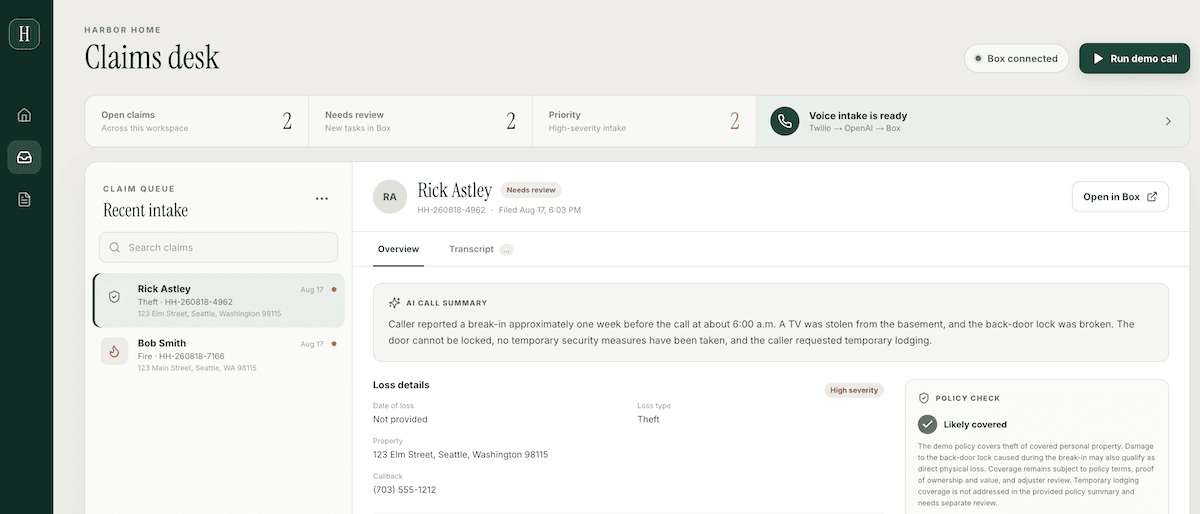
The Next.js dashboard reads claim metadata directly from the configured Box folder. It provides a searchable queue, claim counts, a focused overview, the preliminary policy assessment, recommended next steps, and a link to open the source file in Box.
The transcript is intentionally omitted from the initial list response. When an adjuster opens the transcript tab, the application downloads that one Markdown report from Box and parses the conversation section. This keeps the queue response small and avoids moving sensitive claim detail until it is needed.
For a no-credentials walkthrough, click Run demo call. The application processes a bundled burst-pipe transcript. With OpenAI and Box configured, the same button runs structured extraction and writes the resulting report, metadata, and task to Box. Without credentials, it returns sample data so the interface remains easy to explore.
You can see a deployed version of the no-auth dashboard at: https://box-twilio-agent-demo.vercel.app
Run a live call locally
Twilio needs a public URL for the voice webhook and WebSocket connection. Tunnel the Next.js port with ngrok, set TWILIO_VOICE_PUBLIC_DOMAIN to the hostname only, and start both services through the Vercel development gateway:
ngrok http 3000
npm run dev:all
Point the Twilio number's incoming-call webhook to:
https://<your-host>/voice/twimlAfter the call ends, extraction and Box processing run asynchronously. Wait a few seconds, refresh the dashboard, and open the new claim.
For deployment, import the repository into Vercel and set the Framework Preset to Services. Add the values from .env.example, deploy, and update the Twilio webhook to the production /voice/twiml URL. The voice service automatically uses VERCEL_PROJECT_PRODUCTION_URL or VERCEL_URL when an explicit public domain is not set.
What we learned
In this example, we built a voice-first FNOL application that keeps the homeowner interaction simple while moving the content-heavy claims workflow into Box. Specifically, we used:
- Twilio Agent Connect for the live phone conversation
- OpenAI for concise spoken responses and schema-constrained fact extraction
- Box for the claim report, transcript, policy, metadata, and file versions
- Box AI to compare the FNOL report with policy content
- Box Tasks to route every preliminary assessment to human review
- Next.js to present a focused claims-desk experience
We followed a few practical design principles:
- Separate factual extraction from policy analysis
- Treat missing or invalid AI output as
Needs review - Store the original intake before enrichment so the claim is not lost when analysis fails
- Use Box metadata for operational views and the file itself for full claim detail
- Keep a human adjuster responsible for the final decision
The application still owns the caller experience, validation, orchestration, and business rules, but it does not need to recreate content storage, version history, policy-grounded analysis, or review-task infrastructure.
Next steps
From here, you can extend this demo in a few practical ways:
- Add authentication and role-based authorization before exposing real claim data
- Verify Twilio webhook requests and add production-grade monitoring, retries, and idempotency
- Move in-memory call state to durable storage so active conversations survive restarts or scale-out
- Create a dedicated Box metadata template instead of using
global/properties - Add Box webhooks so task completion and claim-status changes update the dashboard automatically
- Support multiple policy forms and endorsements, selecting the correct policy package for each insured property
- Add secure uploads for photos, receipts, repair estimates, and other supporting evidence
- Introduce adjuster feedback and evaluation so prompts and extraction schemas can be tested against reviewed outcomes
Create a free Box developer account, clone the demo repository and try it out yourself!
If you have any questions or need further support, please feel free to reach out to us here.