Content and context have become more crucial than ever as developers adopt AI-first coding techniques and leverage LLMs for searching for information. To stay at the forefront of that change, Box is launching a new Box developer documentation site that includes:
- AI-powered chat and advanced search to answer any questions related to Box Platform
- Box developer documentation MCP server, which can be invoked directly from your IDE to connect to Box developer documentation
- An interactive API playground, and much more
Here’s a quick tour of the new site and its features.
⚠️ This is a beta version of the new Box developer documentation experience.
We’re actively migrating the remaining interactive experiences from box.dev over the coming weeks. During this transition period, both versions of the site will remain available and interlinked, so you’ll never lose access to the information you need.
What’s new
The whole new developer portal is built on Mintlify, an intelligent documentation platform trusted by companies at the forefront of the AI revolution. That’s why the patterns you’ll notice in our developer documentation site might seem familiar, resembling those of Claude Cursor, Vercel, or Perplexity documentation sites, to name a few.
The first and most noticeable changes you might enjoy are dark mode, a simplified home page, and an enhanced main navigation. You can also quickly access developer guides from the left-hand side panel. This gives you a clear, responsive book structure with global and single-page tables of contents, all designed for enhanced developer productivity.
AI-powered features
AI assistant
To start a conversation with our AI assistant, submit your question to the input at the bottom on the page. A right-hand side panel will open with a generated answer. From now on, you can ask questions about authentication flows, troubleshoot error codes, or get code examples in your preferred language. The chatbot delivers generative answers powered by AI-enhanced search that aggregates results from across all Box sites, giving you the most relevant information without time-consuming searching.
AI hints for code snippet
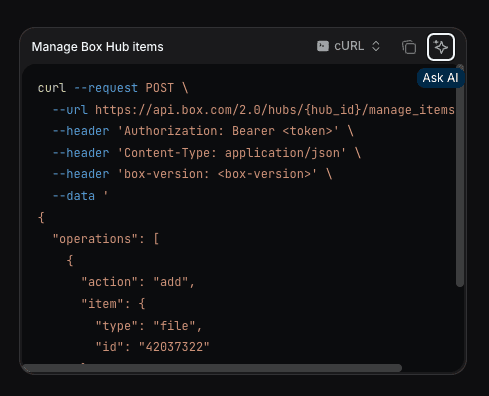
Another form of interacting with the AI assistant is the Ask AI feature within the code snippet component available on the API reference page for each endpoint. Hit the button, and you’ll get a detailed breakdown of the code. It’s definitely a great feature for those starting out with our API.
AI-powered search
Additionally, the search functionality runs on RAG powered by Claude Opus 4.5 and includes a knowledge base of not only the developer documentation, but also Box product documentation, our Box Community Forum, and other useful resources that help you get to know the Box ecosystem holistically.

Interact with Box Developer Docs directly from IDE
Our new contextual menu allows you to perform a set of actions such as asking questions related to a specific page in an AI agent of your choice, including ChatGPT, Claude, or Preplexity.

Moreover, there is the new Box developer documentation MCP server that you can use to interact with Box technical content without even leaving your favourite IDE. Your AI assistant can now pull accurate, up-to-date information to help you write custom apps and integrations, understand authentication patterns, or troubleshoot issues .
Simply click Connect to Cursor to initiate the installation process or copy the link to the MCP server and set up manually. At this stage, you can leverage the tool called SearchBoxDeveloperDocumentation. In further iterations, this MCP server will be also enhanced with additional context of the whole Box OpenAPI specification and will be able to generate even more accurate responses.
Try out endpoints within the API reference page
Our new interactive API testing experience lets you experiment with Box APIs directly within the documentation. Simply select an endpoint, click the Try it button, configure your parameters within the modal, and execute a real API call. For authorization, you’ll need a developer token from Box Developer Console within the app settings interface.
The experience on the Box developer documentation will display the response status code and returned values directly from Box API.
Get started today
We hope you’ll get the most out of our new developer portal. Stay tuned for the next batch of updates with new quick-start guides based on use cases, Box SDK code snippets, and more.
Try it out for yourself: Visit developer.box.com and discover how our AI-first developer documentation can accelerate the creation process of your Box integrations. We’d love to hear what you think about the new experience and how we can improve it further. Post your feedback on the developer forum.