Ransomware is malicious software that encrypts files and blocks access to systems, making them inaccessible until you pay a ransom. This cybercrime spreads through malicious links and software vulnerabilities, then demands payment for the decryption key. Even if you pay, there’s no guarantee the attackers will restore your files, or that they won’t strike again.
A ransomware attack remains one of the most widespread and damaging threats affecting businesses today. When successful, it can cripple an organization. Preventing these incidents involves employing best practices and leveraging secure software.
Let’s define ransomware and its impact on victims in more detail, breaking down how it works, who’s at risk, and how you can defend against it.
Key highlights:
- Ransomware is a form of malicious software that moves across networks or devices to encrypt documents and data, demanding payment to restore access
- A ransomware attack starts when bad actors exploit weak points, such as phishing emails, stolen credentials, or unpatched systems
- To learn how to prevent ransomware, focus on protecting access points, keeping systems patched, educating your workforce, and planning for attack recovery
- Box, the leader in Intelligent Content Management, helps protect your business data by keeping content secure in the cloud, automating file backups, and identifying suspicious activity that signals malware attempts
A closer look at the ransomware definition
Ransomware is a type of malware that holds data hostage. It can block access to files, servers, and network drives, lock users out, and threaten to leak data unless you pay the ransom.
While malware covers a broad range of programs designed to gain unauthorized access or damage computer systems, this subset focuses on locking data through encryption and then demanding payment for the decryption key. Ransomware is a form of extortion, often carried out by organized groups that rely on fear and urgency to force payment.

What is a ransomware attack?
A ransomware attack is the act of infecting a system by tricking a user into opening malicious files or links. Attackers install software that encrypts data and then demand a ransom payment to restore access.
There are common warning signs that you are a victim of a ransomware attack:
- Unusual system slowdowns
- Sudden inability to access files
- Unexpected ransom notes appearing on your screen
- Disabled security software
- Unfamiliar network activity
How does ransomware work?
Ransomware works by locking your data through asymmetric encryption, which uses a public key for file encryption and a private key for decryption. Cybercriminals keep the private key secret, so you can’t access your content or use basic computer functions — then set a deadline for payment before deleting the key or leaking the data.
Here’s a breakdown of how ransomware works when it accesses your devices or systems.
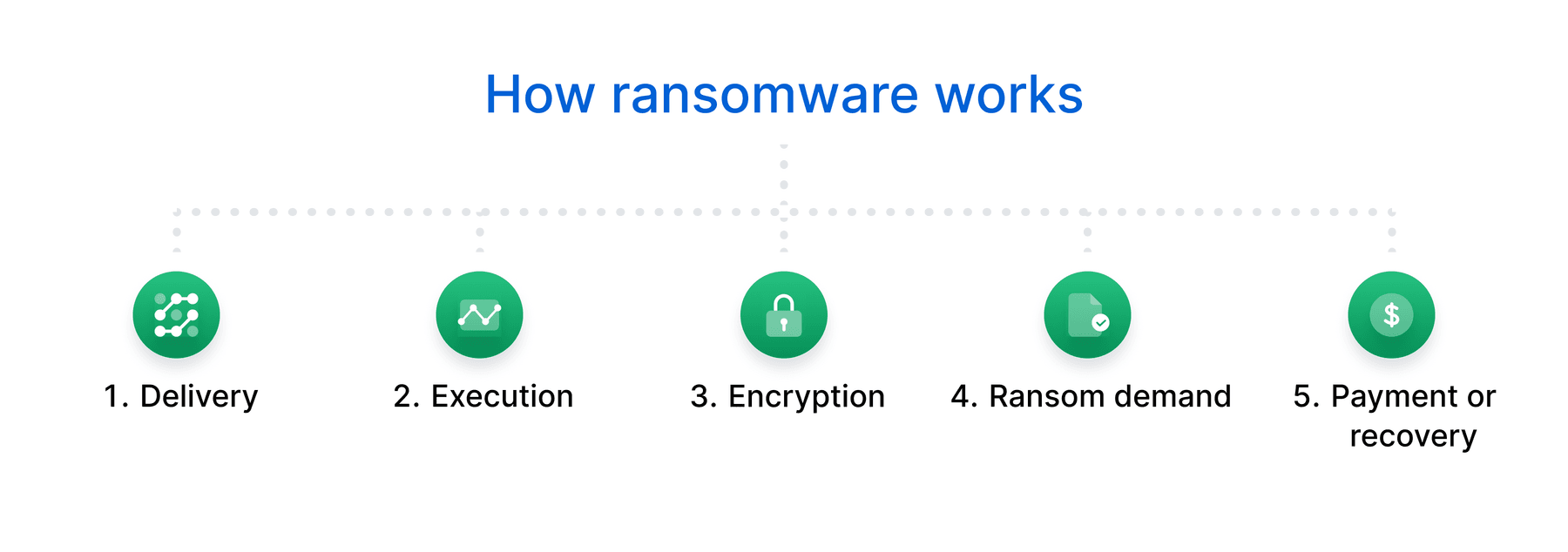
1. Delivery
A threat actor might use various delivery methods to install ransomware on a victim’s device, including:
- Phishing emails: This social engineering tactic used in cyberattacks misleads users into clicking fake emails (pretending to be a colleague, trusted business, or government agency) and downloading an attachment that installs the ransomware onto their device
- Outdated software: Programs missing security patches give attackers an opening to exploit bugs or vulnerabilities already listed in public databases
- Security gaps: Weaknesses like misconfigured firewalls allow unauthorized access to systems and data
- Weak credentials: Simple or reused passwords make it easy for ransomware groups to steal login information, especially when accounts lack controls like multi-factor authentication (MFA)
2. Execution
This stage begins when the ransomware starts operating inside your network or device. It doesn’t always start encrypting files right away: First, it runs quietly in the background to scope out your systems.
Attackers often try to escalate privileges (like gaining admin access) to reach files and shared drives. They move laterally across the network, looking for valuable data or online backup folders to disable. This phase helps the attackers cause widespread damage, leaving your business with limited recovery options.
3. Encryption
After the ransomware installs, it encrypts documents and data on the device. If the device has any file shares attached to it, it targets and locks those files, too. The software then displays a message on the infected device. This message often contains a ransom demand, a method for paying the ransom, and a deadline for when the money must be sent to the attacker.
4. Ransom demand
Once an attack is underway, the criminal will demand money from the victim before providing the private key. Some attackers never provide the key, even after payment, deleting the files or selling them to other bad actors.
5. Payment or recovery
At this stage, the business faces a hard choice: pay the ransom or try to restore its content through established processes and solutions for data backup and recovery.
Paying the ransom may seem like a quick fix, but it carries serious risks, including further attacks, data loss, or leakage. Businesses with reliable, isolated backups and a strong disaster recovery plan might opt for restoring systems safely without giving in to attackers.
Free 14-day trial. No risk.
Box free trial includes native e-signatures, lets you securely manage, share and access your content from anywhere.

Ransomware statistics you should keep in mind
In 2024, the Federal Bureau of Investigation (FBI) reported that the Internet Crime Complaint Center (IC3) received 3,156 complaints identified as ransomware (a 9% increase from 2023), with adjusted losses totaling more than $12.47M. This figure excludes lost business, wages, time, files, equipment, and third party remediation costs, which means the true cost is likely much higher.

As this threat spreads and becomes available to more bad actors, many industries have seen increased attacks and higher demands. Here are critical ransomware statistics you should pay attention to:
- IC3 shows that industries with the most ransomware attacks include critical manufacturing, healthcare, government facilities, financial services, and information technology (IT)
- Sophos’ The State of Ransomware 2024 reports that 59% of organizations were ransomware victims in 2023, a slight drop from 66% in the two years prior, but still enough to keep your guard up
- The same report reveals that organizations paid overall attack recovery costs four times higher — $3M vs. $750K for compromised credentials
- Veeam’s 2025 Ransomware Trends points out that 64% of organizations paid a ransom in 2024, but only 47% recovered their data, while 17% didn’t regain access to information
Why is ransomware so successful?
Ransomware is successful because most defenses can’t stop it before damage occurs. Attackers target gaps in security and move fast once they’re inside. It also spreads because of new technologies that disable preventive measures.
For example, some bad actors are creating cross-platform ransomware with known generic interpreters — programs that run code across multiple operating systems. Malware kits, pre-packaged toolsets that let attackers create and deploy malicious software, also make it easier for bad actors to quickly craft novel malware samples. And criminals are finding new techniques to spread malware, such as encrypting an entire disk instead of just a few files.
The growing trend of ransomware-as-service
Attacks continue to succeed in part because of the rise of ransomware-as-a-service (RaaS), which is a subscription designed to give affiliates ransomware tools that are ready for use. Since RaaS gives bad actors a more decentralized method of attack and extended reach, it’s harder for authorities to stop these threats.
Many RaaS creators also take a cut of the ransom, meaning ransomware groups are likely to demand higher payments. Many victims end up paying the ransom in an attack, which makes ransomware a lucrative way for threat actors to make money.
What are the most common types of ransomware?
Though there are a few different types of ransomware, the main ones are screen lockers and crypto-ransomware.
- Locker ransomware blocks victims from using basic computer functions. It may partially disable the mouse and keyboard but still allow limited interaction, enough for the victim to see and respond to the ransom demand. If the victim pays, the attacker may unlock the device.
- Crypto-ransomware, on the other hand, encrypts sensitive data. These attacks usually don’t affect basic functions, but locking key files often causes panic. This type can be more damaging because attackers may delete files if victims don’t meet their demands.
Navigate the cloud security threat landscape to prevent ransomware and other attacks.
Ransomware examples to watch for
According to the FBI, these are the five most reported ransomware examples based on the number of complaints in 2024.
| Position | Ransomware example | What characterizes this variant |
| 1 | Akira | Akira often breaches networks through VPN vulnerabilities or exposed services, stealing data before encrypting files, then threatens to leak it unless victims pay the ransom. |
| 2 | LockBit | LockBit uses ransomware-as-a-service, where affiliates rent access to the software and split ransom profits. Known for its automation, this variation can quickly lock down multiple systems. |
| 3 | RansomHub | RansomHub targets corporate networks and emphasizes double extortion: data theft plus encryption. It often threatens to publish or auction the victim’s data on the dark web. |
| 4 | FOG | FOG spreads through phishing or compromised remote desktop protocol (RDP) credentials. It leaves ransom notes that direct victims to a payment portal, typically hosted on the dark web. |
| 5 | PLAY | PLAY frequently gains access through exposed systems or stolen credentials. It targets government agencies, law firms, and IT service providers. |
Who is at risk for ransomware attacks?
Any individual or organization, from government agencies to companies of all sizes, can face ransomware threats if they have vulnerable systems and weak cybersecurity. Strengthening defenses and having a clear response plan helps minimize damage and speed recovery if an attack occurs.
How to prevent ransomware incidents in your organization
While you can take action to recoup your stolen data or minimize damage after ransomware incidents, it’s best to prevent attacks from occurring in the first place.
Here are six best practices on how to prevent ransomware attacks in your organization.
1. Stick to secure networks
Ransomware attackers can use unsecured networks to gain information about a company and find ways into a device, so it’s essential that your organization has a secure network. Whenever a team member uses a work device on public Wi-Fi networks, they are putting your organization at risk, as many of these networks are not secure.
When employees work from home or in public, consider having them use VPNs to ensure they are securely connected to the internet, no matter where they are.
2. Back up your data
Backing up your data in the cloud is one of the best ways to prevent ransomware. If you have your data backed up, you can wipe an infected device and still retrieve your files when an incident occurs. Instead of paying the ransom, you can simply delete everything with peace of mind and no financial consequences.
While external hard drives or servers remain vulnerable to physical damage and theft, cloud backup solutions offer stronger security through encryption, automated updates, and the flexibility to access your file storage from anywhere.
Compare online backup vs. cloud storage to understand the differences.
3. Secure your data backups
If you back up your data, make sure the solution you use keeps those backups secure. Look for backup services that offer data redundancy and role-based file and folder permissions, so only authorized users can access or modify content.
4. Practice safe internet surfing
Anyone who works for your organization and has access to sensitive data needs to be careful while browsing the web. As they use the internet, they should only download applications after verifying that the software comes from a trusted source.
Team members should never respond to messages from people whose identities they can’t confirm. Ensuring employees stay on guard while accessing the internet can significantly reduce the chance they accidentally download ransomware.
5. Create a security awareness program
Implementing a security awareness program is one of the most effective ways to teach your team how to defend against ransomware. By regularly conducting cybersecurity training, you reduce the chance that your employees will fall for social engineering or phishing attacks.
Schedule these trainings regularly and assign someone to oversee them so your team consistently follows security best practices.
6. Use security software and keep it up to date
Ransomware in cybersecurity is constantly evolving, forcing protection tools to adapt to new threats. Select an enterprise content management (ECM) system with an excellent reputation for staying on the cutting edge of stopping cybercrime, especially malware. Always download and install updates as soon as they become available to avoid new threats getting past your defenses.

How to recover from ransomware attacks
Even when you understand how to avoid ransomware, you may still encounter a threat. If an incident occurs, you need to know how to deal with it effectively to minimize damage. Having a response plan in place helps your team take appropriate action quickly.
Review the steps to address the risks and mitigation of malware and ransomware effectively.
1. Quarantine any infected devices
Infected devices will continue to spread ransomware to any other connected system. Just like isolating patients infected with a virus, you must quarantine infected equipment to limit further impact.
Reaction time is everything. When you detect ransomware on a device, immediately disconnect it from other equipment, the internet, and your organization’s network. This step prevents the malware from moving laterally and infecting other systems, which buys you time to contain and remove it before it spreads further.
2. Prevent the spread
Quickly quarantining an infected device serves as the first step after ransomware detection, but don’t stop there. This threat can spread very fast, and the compromised equipment may not be the source of the original infection.
For this reason, immediately remove any other potentially infected devices from the network. Even if a device is off-premises, you’ll want to disconnect it, as attackers could still gain access to it. You may also want to power down Bluetooth, Wi-Fi, and any other wireless connectivity methods.
3. Assess damage
To enable faster ransomware recovery, evaluate the damage promptly to identify affected systems and data. Look for files users can’t open, strange file names, and odd file extensions. When you find systems that aren’t completely encrypted, turn them off and quarantine them to stop the threat from spreading.
During the damage assessment stage, create a list containing information on every affected system, including external hard drive storage, smartphones, laptops, cloud storage, and network storage devices. This step lets you identify how many devices and network segments the ransomware has impacted, so you can assess the damage accurately.
You can also lock down shares — folders and storage locations accessible by multiple devices on your network — to stop ransomware from continuing to encrypt files or spreading further. Before locking them down, check which shares already contain encrypted files. If one device has significantly more open or encrypted files than others, it could help identify where the infection started.
4. Find patient zero
Preventing greater damage to your system and keeping track of a ransomware infection is much easier when you know where the attack started. You’ll want to identify your “patient zero,” the first compromised device.
You can often find patient zero by:
- Looking at your active monitoring platform, endpoint detection and response (EDR) tools, or ransomware solution for suspicious activities
- Speaking with your team members about any suspicious emails they opened or any other irregular activity they noticed
- Checking your files’ properties, since the employee listed as the infected file’s owner often marks the entry point.
5. Identify the type of ransomware
Since ransomware comes in different forms, you’ll want to identify what type of ransomware program is attacking your organization. After detecting the malicious program, research its behavior and alert employees to the ways the program will attempt to infect their files.
6. Report the ransomware to the authorities
Understanding how to combat ransomware also means taking prompt action to contain the threat and notifying relevant authorities immediately. Reporting the crime may give you access to more advanced tools and abilities that only law enforcement agencies can access.
By partnering with the appropriate authorities, you can bring bad actors to justice and recover stolen data before attackers use it to do harm.
7. Eliminate ransomware, and use your backups
After you’ve contained and neutralized a ransomware infection, use an uninfected backup to restore your system. Before you restore your data, use an anti-malware or antivirus solution to ensure that all your infected devices don’t have any scripts that might trigger another outbreak.
After you recover your data, verify that your apps run correctly, your processes work as expected, and your files are fully restored before resuming normal operations.
8. Research your decryption options
When you don’t have a backup, you can sometimes still recover your data via decryption with free decryption keys that may work to unlock your data. Be sure to look for a decryption key designed for the type of ransomware that locked your files.
Implement effective ransomware prevention with Box
Box, the leader in Intelligent Content Management, gives you a cloud-native platform for secure data storage, file sharing, collaboration, and more. We power 100K+ leading organizations with multiple tools and features designed to protect your company’s content.
Here’s how you strengthen your defenses with Box:
- Box Shield uses machine learning to help reduce the risk of a ransomware incident. You get timely alerts on malware attacks and potential account compromises. Box Shield easily integrates with your cloud security portfolio, complementing the tools you already have in place.
- Our security and compliance solutions give you full visibility and control over your data, so you can protect your operations with AES 256-bit encryption, granular access controls, data classification, and robust authentication methods.
- Box cloud backup solutions allow you to back up files of all types, and it’s easy to upgrade if you need more space. If you experience a data loss incident, we also offer failsafe cloud backup, with multiple data centers and backup systems to grant 99.9% SLAs and redundancy.
Contact us to see how Box helps protect your business against ransomware and other threats.

While we maintain our steadfast commitment to offering products and services with best-in-class privacy, security, and compliance, the information provided in this blog post is not intended to constitute legal advice. We strongly encourage prospective and current customers to perform their own due diligence when assessing compliance with applicable laws.