If you're deploying AI agents in your enterprise, you've probably thought, "We'll bolt security on once the agents are working." Or worse: "Governance will slow the agents down, so we'll deal with it later."
The reality is that AI agents don't act like the tools that came before them. They take actions on your content, on behalf of your users, at machine speed. Bolt-on security fails the moment an agent moves faster than the review process behind it.
Why this matters now
Enterprises are moving from thousands of human users clicking through content to potentially millions of agents acting on that same content. Every governance assumption built for human scale, periodic reviews, manual approvals, after-the-fact audits, breaks at agent scale.
This isn't a trend. It's a structural shift. Agent-scale governance has to be rule-driven, inherited by default, and enforced in real time, or it isn't governance at all.
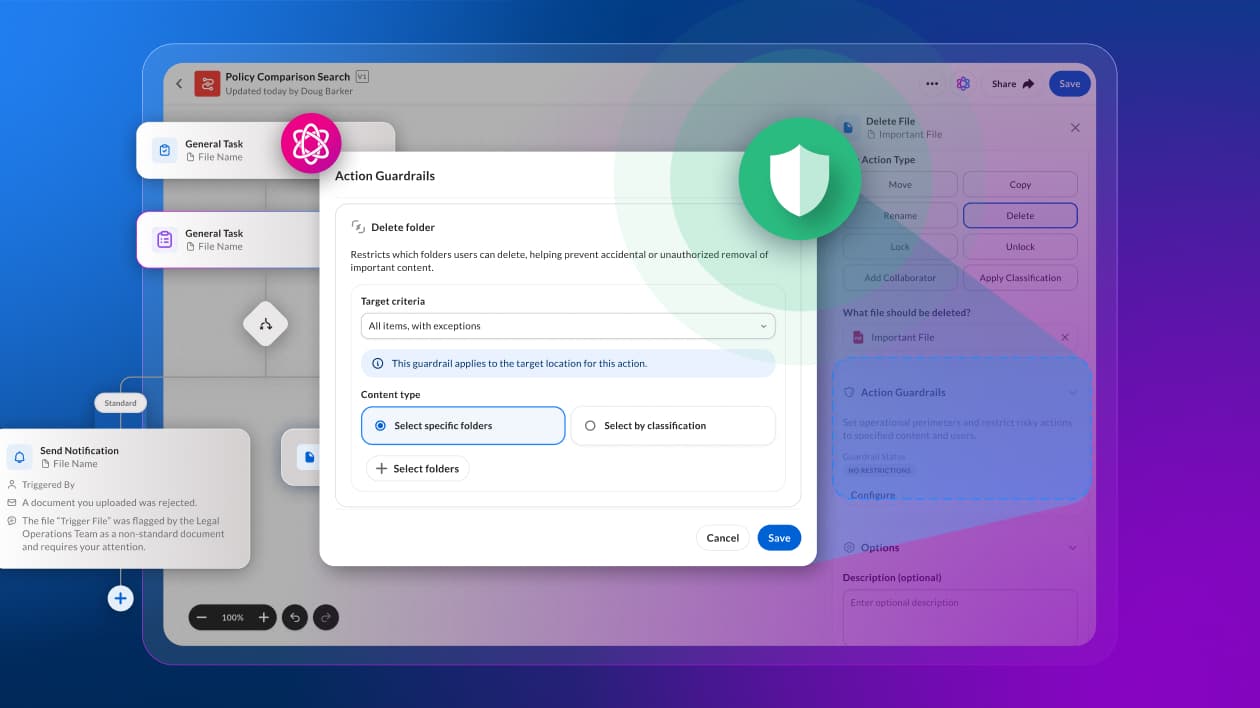
To solve this, Box Agent guardrails provides built-in controls executed at agent runtime that enterprises need to deploy AI agents safely and at scale.

The architecture, stage by stage
Box agent guardrails are built on three dimensions, applied across three lifecycle stages. Every stage has an explicit governance checkpoint. Nothing is bolted on.
The three dimensions of every guardrail:
- Content scope: which folders and items an agent can access
- User scope: an allow or deny list of users an agent's actions can target.
- Human-in-the-loop (HIL): when the agent must pause for human review
A. Setup and configuration
Enterprise defaults are set once, inherited everywhere.
- Box Admin sets enterprise-wide guardrails in the Admin Console.
Governance checkpoint: these defaults apply automatically to every custom Box Agent on creation. - Agent Creator builds a custom agent in AI Studio's Agent Builder.
Governance checkpoint: enterprise guardrails are inherited at creation, not opt-in. - Agent Creator may edit enterprise guardrails, if permissions allow, and adds agent-specific rules.
Governance checkpoint: edit rights are permission-gated at the admin level. - Agent is deployed with combined guardrails: enterprise defaults plus agent-specific configuration, stored with the agent.
B. Execution and evaluation
When a user triggers an action, the Actions Platform evaluates the request against the agent's guardrails in real time, before anything runs.
- Scenario A, no guardrails configured: the action runs. No restrictions, no review.
- Scenario B, guardrails without HIL: positive evaluation allows the action; negative evaluation denies it.
Governance checkpoint: rule enforcement is automatic and pre-execution. - Scenario C, guardrails with HIL: you choose the mode.
- Confirm exceptions: allowed actions run; flagged actions pause for user approval.
- Confirm permitted actions: allowed actions pause for user approval; flagged actions are denied.
Governance checkpoint at this stage: every action is evaluated against guardrail before execution, and the evaluation outcome is logged.

C. Results and user experience
Every evaluation ends in a transparent outcome, surfaced directly in the chat interface.
- Blocked (Deny): the user sees a plain-language message that the action was restricted by rule. No data moves.
- Review required (Ask): the user gets an inline approval prompt with Approve and Deny buttons. No context switching, no separate tool.
- Allowed: the action runs.
Governance checkpoint at this stage: users always know why an action paused or stopped, and approvals happen where the work is happening.

Architecture diagram

A concrete scenario
Imagine a legal team deploys a custom Box Agent to help paralegals draft NDA responses. The agent has access to a folder of active matters, some of which include confidential client financials and internal counsel notes.
Without guardrails, the paralegal asks the agent to summarize open matters. The agent pulls from every file it can see, including the confidential subfolder it was never meant to touch. Sensitive content ends up in a chat response, then in an exported draft, then in an email.
Here's what changes with Box Agent guardrails:
- Content scope restricts the agent to the paralegal-accessible subfolder. The confidential files are invisible to the agent, not just filtered from output.
- User scope restricts who the agent's actions can reach. For the NDA workflow, sends and shares are limited to an allow list of internal counsel and approved outside firms. External or unlisted recipients are automatically denied.
- HIL, confirm permitted actions mode, requires approval before any drafted response leaves the chat. Nothing goes out until a human signs off.
Rather than just blocking failures, the system's guardrails stop them from occurring in the first place.
Enterprise self-assessment checklist
Ask your team:
- Can you set enterprise-wide AI agent guardrails in one place, and have every new agent inherit it automatically?
- Can you restrict what content an agent can touch, and who it can share with, without writing custom code?
- Can you require human approval for sensitive actions, inline, without breaking the agent's workflow?
- Can you show an auditor exactly what your agents did, why, and who approved each action?
For many organizations, the honest answer to most of these questions is "not yet." Box Agent Guardrails answer each one directly: rules set once in the Admin Console, inherited on every agent, enforced in real time, and surfaced transparently to the end user.
What you can build
Because agent actions are governed, you can safely:
- Deploy agents against sensitive folders (finance, legal, HR) without carving out separate copies of content
- Let end users trigger high-value actions (draft, extract, update, share) with confidence that guardrails fires before execution
- Extend agent workflows to broader user populations without expanding your review team headcount
- Log every agent action for compliance reporting and incident response
Governance isn't a brake here. It's what lets you say yes to more agent use cases, not fewer.
What's next
We're extending this permissions-first model to multi-agent workflows, so provenance and approval logic hold up when one agent hands work to another. The same guardrail dimensions (content scope, user scope, HIL) will extend to a broader set of agent ecosystems, including MCP partners, so third-party agents operating on Box content inherit the same enterprise-wide AI agent rules your Box Agents do.
The bottom line
Box agent guardrails aren't a wrapper on top of an agent runtime. They're a rule-driven framework woven through every stage of the agent lifecycle: configured once, inherited automatically, and enforced in real time. That's what makes it possible to give AI agents real freedom to act, and real guardrails to act safely.