I’ve been playing with a pattern for helping agents use team knowledge without wandering through a giant folder tree.
The setup is more or less straightforward: a company brain lives in Box, and a small Claude Skill helps route the request to the right source material. I’m calling the skill Knowledge Router.
The skill doesn't contain the knowledge base. It reads a map in Box, follows the routing rules, links back to the source docs, and saves new work back into the shared workspace.
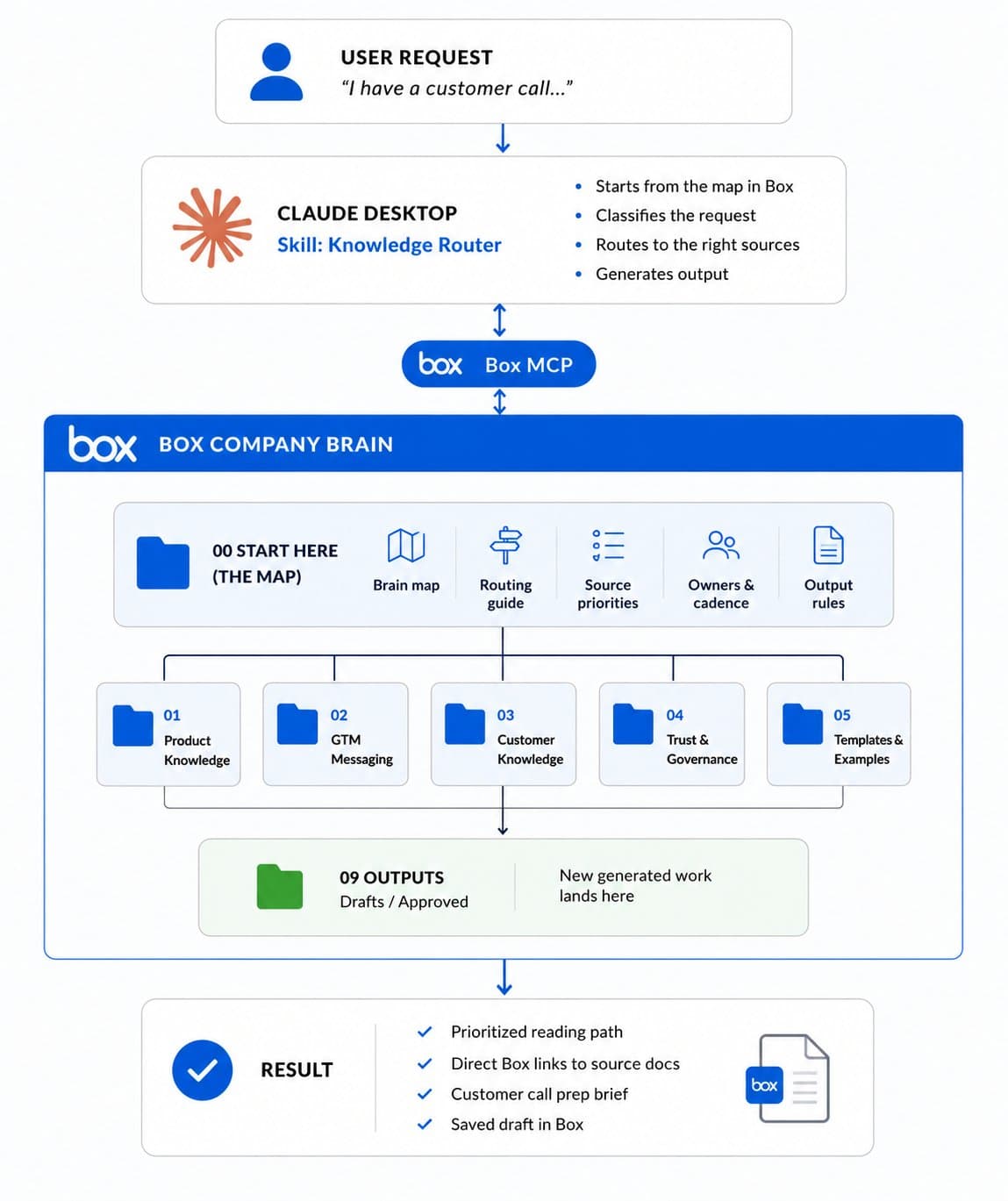
Architecture diagram showing User Request → Claude Skill → Box MCP → Box Company Brain → Source Docs → Draft Output
The idea
A lot of AI workflows start with access: give the agent a folder of docs and let it search.
That can work, but team knowledge is usually messier than that. Product docs sit next to GTM messaging. Security FAQs sit next to policy drafts. Examples sit next to approved guidance. Some files are source of truth, some are just useful context, and some should not be treated as final.
So I wanted to try a slightly different pattern: give the agent a map.
In this demo, the map lives in Box. The Skill just knows where to start and how to use it.
The company brain
For the video, I used a fictional company brain for a company called Northstar. The Box folder has areas like Product Knowledge, Customer Knowledge, Go-to-Market, Trust and Governance, Brand and Voice, Templates, and Outputs.
The important folder is 00 Start Here.
That’s where the routing docs live:
00 Start Here
├── company brain map.md
├── navigator routing guide.md
├── source priority rules.md
├── owners and review cadence.md
└── output formatting rules.md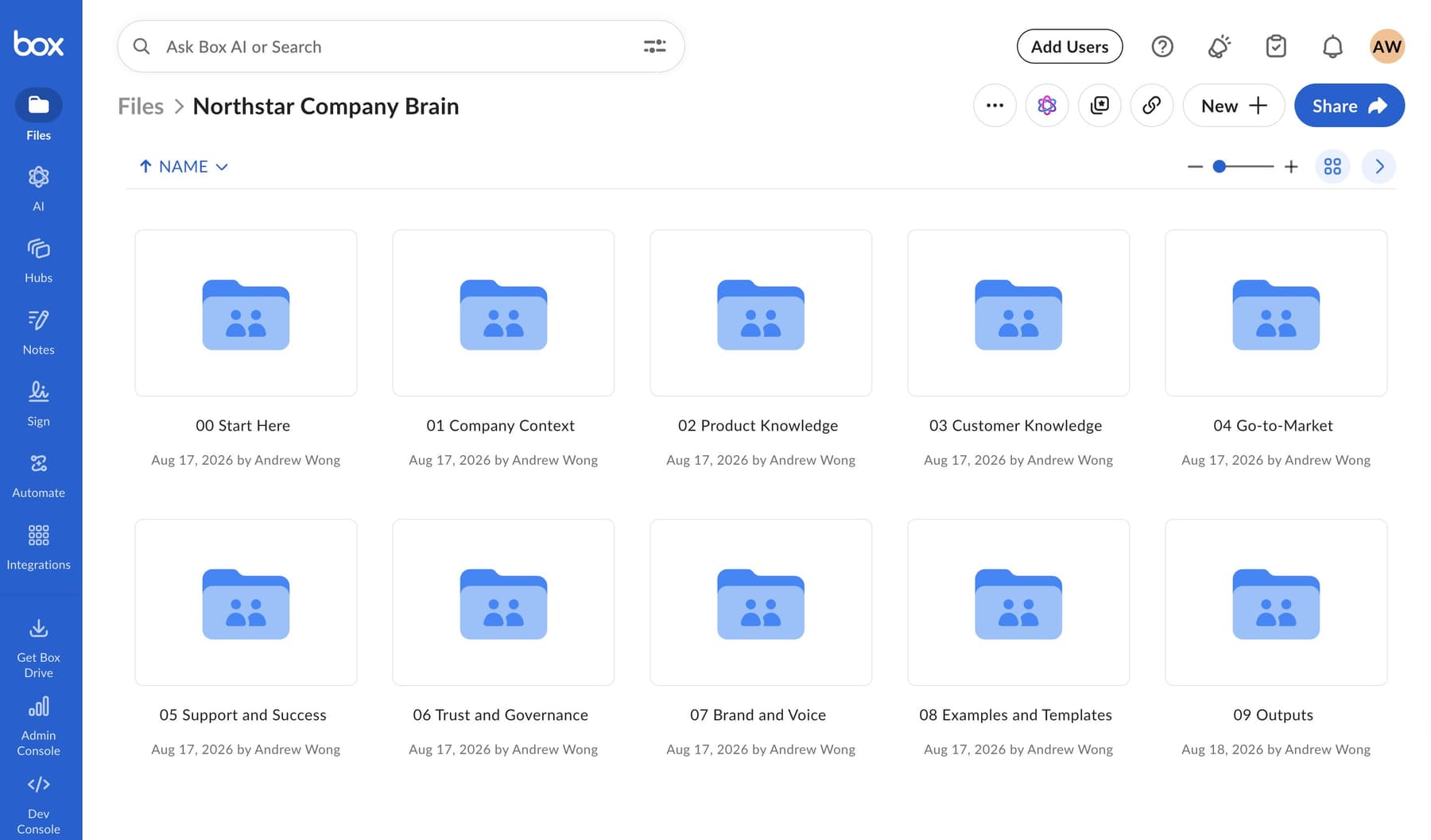
Box UI showing the Northstar Company Brain folder and 00 Start Here
The Skill starts there. It reads the map, classifies the request, and then follows the routing logic to the right files.
That separation is the whole point. If the knowledge base changes, I update the files in Box. I don’t need to keep rewriting the Skill.
What the Skill actually says
The full skill is on GitHub if you want to copy it or adapt the pattern: https://github.com/box-community/knowledge-router-demo-skill
The core of the Skill is pretty small:
The skill is a routing layer. Box holds the knowledge.

Do not hardcode the full folder structure, file list, owners,
or routing logic beyond the stable root folder ID.

Always treat the current Box contents as the source of truth.
That’s the pattern I like: the Skill is a thin control layer. It gives Claude a repeatable way to navigate, but the knowledge, ownership, review status, and source files stay in Box.
The workflow is also straightforward:
1. Open the root Box folder.
2. Inspect the current folder structure.
3. Start in `00 Start Here`.
4. Read the most relevant routing files.
5. Use those files to classify the request.
6. Read only the files needed to answer the user’s request.
7. Include Box links for recommended files.
8. Return a clear path through the company brain.
Prompt one: find the right sources
The first prompt in the demo is a normal work request:
Use the Knowledge Router.

I’m preparing for a customer call tomorrow with a VP of Customer Success
who wants to understand our AI agent product.

They care about improving team productivity, but they’re worried about
permissions and data security.

I only have 20 minutes to prep — what should I read first?
I like this prompt because it does not tell Claude which folders to search. It just describes the situation.
The Skill routes the request across the right parts of the company brain: customer context, product knowledge, GTM messaging, and trust guidance. Then it gives me a short reading path with direct Box links.
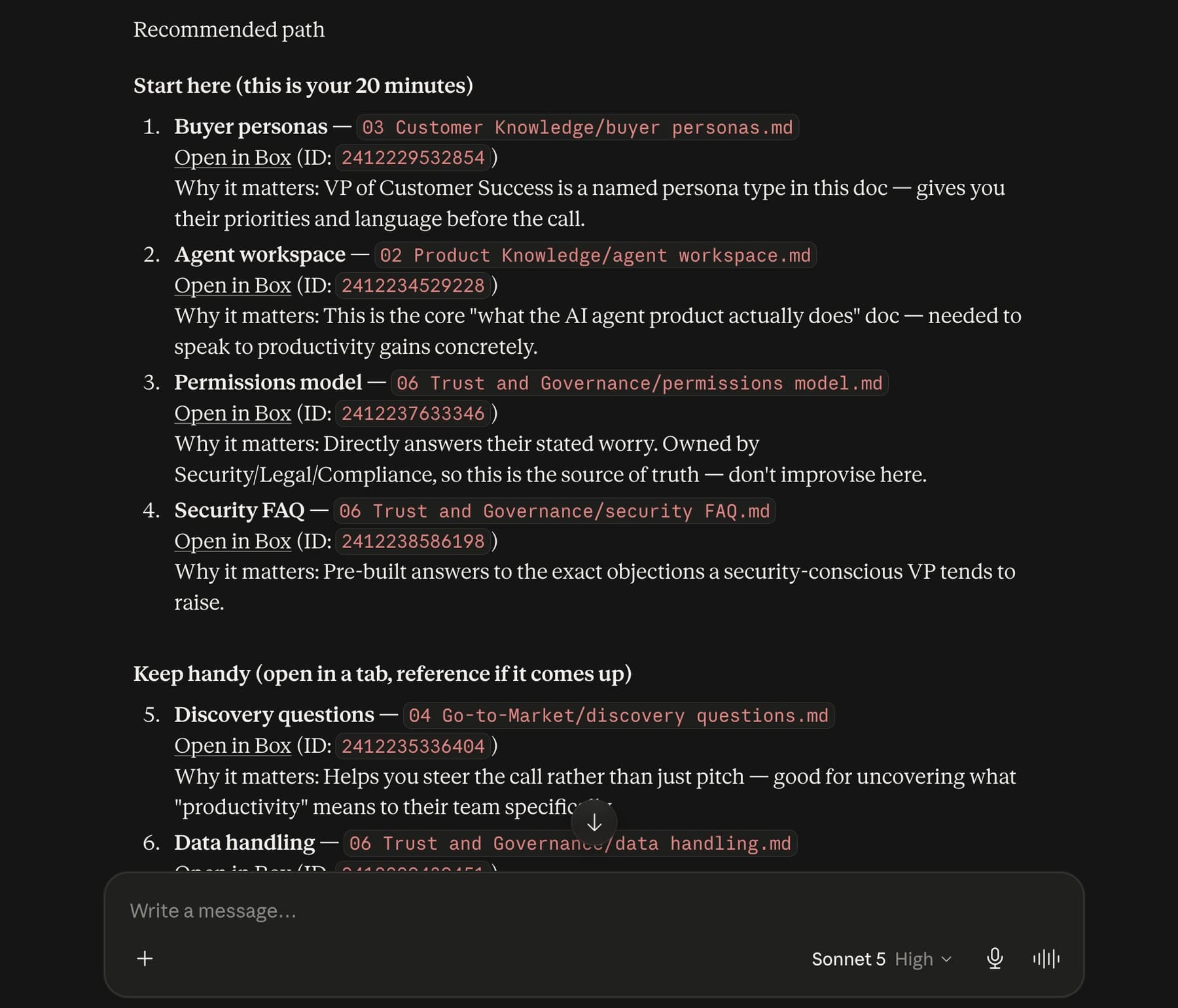
Claude response showing grouped recommendations with Box links
That link detail matters. I don’t want the agent to say “go read the permissions model” and make me dig for it. I want to click straight into the source file.
So the Skill includes this rule:
When referencing a Box file or folder, include a clickable Box web link
whenever an ID or direct URL is available.
Now the response is more than a summary. It’s a path through the workspace.
Prompt two: create the brief
After Claude finds the right sources, I give it a follow-up:
Great — use the sources you recommended and create a short customer call
prep brief for me.

Save it as a Markdown file in `09 Outputs/Drafts` with the filename
`vp-customer-success-call-prep.md`.

At the top of the brief, include the source files you used with Box links.
This is my favorite part of the demo.
Claude uses the source docs, drafts a customer call prep brief, includes the source links at the top, and saves the file back into Box under 09 Outputs/Drafts.
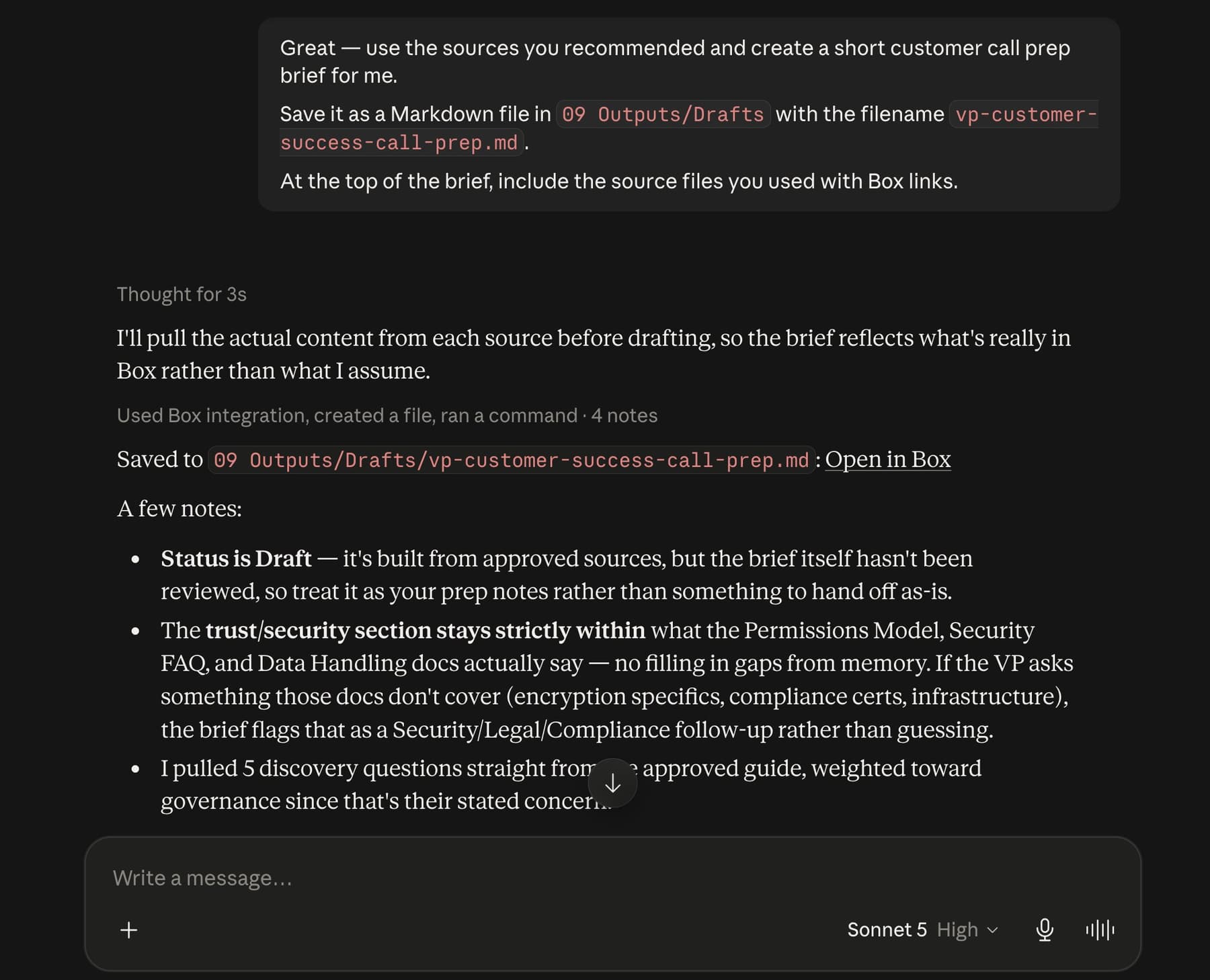
Box UI showing the generated vp-customer-success-call-prep.md file in 09 Outputs/Drafts
That means the output is not trapped in the chat. It lands in the shared workspace, where someone else can review it, edit it, move it forward, or reuse it later.
I also like saving it to Drafts. The agent created something useful, but that does not make it approved guidance. Drafts is the right place for generated work until a person reviews it.
The Skill makes that explicit:
If asked to save the draft, save it under the appropriate folder in
`09 Outputs`, usually `09 Outputs/Drafts`.

Do not save to `09 Outputs/Approved` unless the user explicitly says
the content has been reviewed and approved.
Why this feels useful
The demo is customer-call prep, but the pattern is not limited to that.
A new hire could ask what to read first. A support lead could prep for an escalation. A sales engineer could pull approved security answers. A product marketer could draft a one-pager from product, GTM, customer, and brand sources.
The flow stays the same:
User describes the work
→ Skill reads the map
→ Agent routes to the right sources
→ Agent returns links or creates an output
→ New work goes back into Box
That’s the reusable takeaway for me.
The Skill stays small. The map and source material live in Box. The user can ask in normal language. The response links back to the files. And when the agent creates something new, that work lands back in the company brain instead of disappearing into chat.
You don’t need a huge custom app to start experimenting with this. A folder structure, a few markdown routing files, a Claude Skill, and a Box connection can go a long way.
Give the agent a map, not just a pile of documents.
You can find the full demo skill here: https://github.com/box-community/knowledge-router-demo-skill